
You publish pages on your website. You write blog posts. You add services and products. Maybe you spend time trying to improve your Google rankings.
But how often do you actually look at the searches causing your website to appear in Google?
That's one of the reasons I consider Google Search Console one of the most important tools a business owner with a website should be using.
Google Search Console can show you the actual search queries where Google has displayed pages from your website, how often your pages appeared, how many people clicked, your average position and which pages are getting visibility.
And lately, there's another reason I've been paying even closer attention to this data.
SEOs are finding unusual, highly specific queries in Search Console that resemble some of the searches AI systems can generate while researching answers.
That doesn't mean Search Console can tell you, "ChatGPT searched for your business." It can't.
But the patterns are interesting, and they give us another reason to stop looking only at rankings and start paying attention to what is actually being searched.
What Is Google Search Console?
Google Search Console is a free tool from Google that helps you understand how your website is performing in Google Search.
If you own a website and haven't connected it to Search Console, you're missing information that can help you make better decisions about your website, SEO and content.
You don't need to be an SEO expert to use it.
One of the most useful sections for a business owner is the Performance report.
This is where Google can show you:
- Clicks: How many times someone clicked your website from Google.
- Impressions: How many times a page from your website appeared in search results.
- Average position: Approximately where your website appeared for different searches.
- Click-through rate: The percentage of impressions that resulted in a click.
- Queries: The actual searches that caused your website to appear.
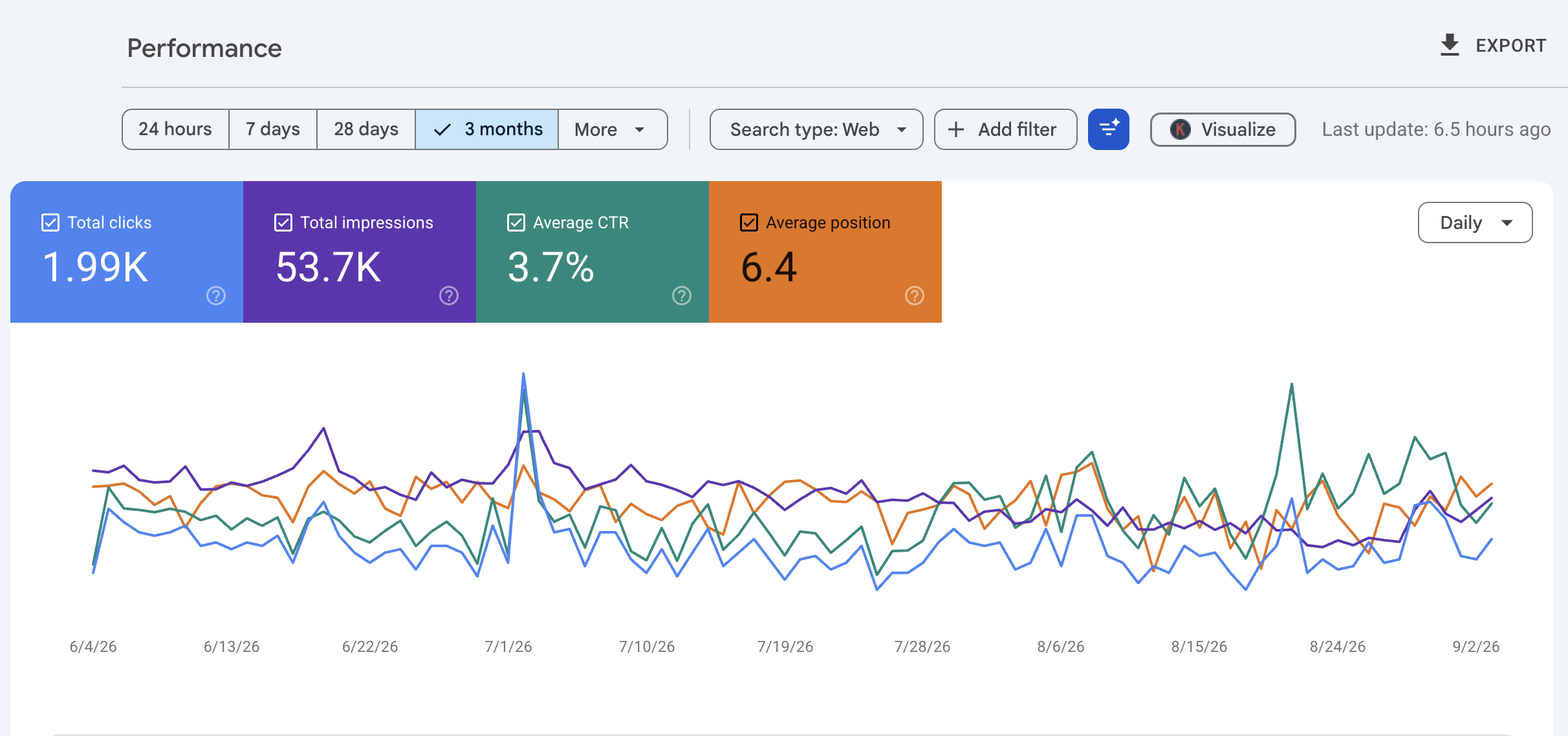
Below shows an example of what the Performance report looks like. In this three-month period, the website appeared in Google Search results 53,700 times and received 1,990 clicks. The average click-through rate was 3.7%, with an average position of 6.4.
At first glance, those numbers might look like everything you need to know. But they're not.
The next question should be: What searches caused the website to appear 53,700 times?
That's where the Queries report becomes especially useful.
Your Website Doesn't Have Just One Google Ranking
This is something I wish more business owners understood.
People often ask: "What does my website rank on Google?"
But your website doesn't have one ranking. One page might appear for dozens or hundreds of different searches.
A contractor could appear for:
- commercial HVAC repair Los Angeles
- rooftop AC repair near me
- emergency HVAC company
- commercial air conditioning maintenance
- how much does commercial HVAC maintenance cost
Those searches don't necessarily have the same ranking. They also don't have the same intent.
Someone searching for an HVAC company is behaving differently from someone searching for the cost of HVAC maintenance.
That's why looking only at a report that says you're "#4 on Google" doesn't tell you enough. #4 for what?
The Searches Matter Because They Reveal Intent
Search intent is simply what someone is trying to accomplish with their search.
- Are they trying to learn?
- Compare?
- Buy?
- Hire someone?
- Find pricing?
- Read reviews?
- Solve a problem?
- Verify that a company is legitimate?
The words people use give you clues.
For example: SaaS
- best reporting software for Dynamics 365
- Dynamics 365 reporting software pricing
- Power BI vs [software]
- [software name] reviews
Contractor
- emergency plumber Santa Monica
- cost to replace electrical panel
- best roofing contractor near me
- [contractor name] reviews
Coach or consultant
- business coach for contractors
- business coaching prices
- best marketing consultant for small business
- [consultant] reviews
Ecommerce
- best dog bed for senior dogs
- waterproof dog bed reviews
- [product] vs [product]
- official [brand] website
Those searches are telling you much more than a ranking number ever could. They're telling you what people want to know.
Search Console Can Help You Decide What Content to Write
This is where Search Console becomes especially useful for content. You don't always have to start with a keyword research tool and ask: "What should I write about?"
Start by looking at what Google is already showing your website for.
- You may discover searches where you're getting a lot of impressions but very few clicks.
- You might find a question appearing repeatedly that you barely answer on your website.
- You might discover Google showing one of your pages for a service you mention only briefly.
Or you may see people searching for your business along with words like:
- pricing
- cost
- reviews
- experience
- best
- compare
- vs
Those aren't just keywords. They're content ideas.
If people repeatedly search for your service plus "cost," perhaps your website needs better information about pricing.
That doesn't necessarily mean publishing an exact price if your pricing varies.
You could explain what affects the price, typical price ranges, how estimates work, what's included and why one project might cost more than another.
If people search for reviews or experience, look at the proof you're providing.
If people search for comparisons, consider whether your website helps someone understand the differences between their options.
This is why I don't believe content writing should be about stuffing keywords into pages.
The search should help you understand the question. Your content should answer it.
How Often Should You Check Google Search Console?
You don't need to log into Search Console every morning.
For most small business owners, I would look at it at least once a month.
If you're actively publishing content, changing your website, working on SEO or trying to grow traffic, I'd look more often, perhaps every week or two.
More importantly, compare time periods.
Don't just look at the last seven days and react to every change. Look at:
Last 28 days vs. previous 28 days and occasionally: Last 3 months vs. previous 3 months
You want to identify patterns.
- What's growing?
- What's declining?
- Which pages are getting more visibility?
- What new searches are appearing?
- What searches are getting impressions but few clicks?
- Which searches are bringing the right people to the website?
That last question matters. More traffic isn't automatically better traffic.
Don't Just Look at Clicks
This is another mistake I see. A business owner opens Search Console and immediately looks for clicks.
Clicks matter, obviously. But impressions can tell you something before the clicks arrive.
Suppose you publish a new page for a service. A few weeks later, you see that page has only received 12 clicks. That might not sound impressive.
But perhaps it has gone from 100 impressions to 1,500 impressions. Google is showing the page considerably more often. Now you can investigate the searches producing those impressions.
- Are they relevant?
- Is the page moving up?
- Is Google understanding what the page is about?
- Could the page title be improved?
- Does the content actually satisfy the searches you're seeing?
Search Console can help you ask better questions.
Now There's Another Interesting Reason to Look at Your Queries
This is where things get particularly interesting.SEOs have been investigating unusual queries appearing in Search Console that resemble fan-out queries used by AI systems.
Here's the simple explanation.
When you ask an AI system a complicated question, it may not treat your prompt as one single search.
It can break the subject into multiple smaller questions and searches as it gathers information for its answer. Those are commonly referred to as fan-out queries.
Researchers and SEOs have noticed patterns containing words and search operators such as:
- site:
- official
- 2025
- 2026
- best
- top
- pricing
- cost
- review
- reviews
- experience
- criteria
- versus
- vs
Some are considerably stranger and more detailed than the searches you'd normally expect a person to type into Google.
An important warning
Finding one of these searches in Search Console does not prove ChatGPT, Gemini, Claude or another AI system searched for your website. Search Console doesn't provide that attribution.
Automated tools, crawlers, rank trackers and humans can also generate unusual searches. So don't look at one strange query and announce: "ChatGPT found my website!"
That's not what the data tells us. What interests me is the pattern over time.
Try This Search Console Filter
If you want to explore your own data, go to: Google Search Console > Performance > Search Results > Add Filter > Query > Custom (regex) > Matches regex
Then try: official|2025|2026|best|top|pricing|cost|review|reviews|experience|versus|vs
This tells Search Console to show queries containing any of those terms. We're essentially saying: "Show me searches containing official OR 2025 OR 2026 OR best OR top OR pricing..."
You don't need to understand regular expressions to use it. Copy it, paste it into the filter and look at what comes back.
And I wouldn't stop there. Change the filter based on your business.
A contractor might investigate: cost|price|pricing|best|reviews|near me|repair|replace|versus|vs
A SaaS company might look at:
pricing|cost|review|reviews|best|alternative|alternatives|compare|comparison|versus|vs
An e-commerce company might investigate: best|reviews|review|official|compare|comparison|versus|vs|price|buy
An agency or consultant might look for: best|cost|pricing|reviews|experience|agency|consultant|versus|vs
Now you're investigating your market, not blindly copying somebody else's keyword list.
What Could These Searches Tell You? This is the part I find most useful.
Don't get so caught up in determining whether a query came from an AI system that you overlook what the query itself is telling you.
Suppose you repeatedly see searches containing official and your brand name. That could indicate someone or something is trying to identify an authoritative first-party source.
- Is your website clearly identifiable as the official website for your company?
- Does it clearly explain who you are, what you do and where you operate?
- Do other trustworthy websites corroborate that information?
- Suppose pricing and cost repeatedly appear.
- Do you have useful pricing information?
Suppose you see best, comparison, versus or criteria. Someone may be evaluating options.
- Does your website explain how someone should choose?
- Do you explain what makes your service different?
- Do you acknowledge alternatives?
- Do you provide enough information for someone to compare you intelligently?
Suppose reviews and experience appear. Where's the evidence?
Testimonials, case studies, years in business, customer results, credentials, project examples and independent reviews may all help someone evaluate the business.
That's where this becomes much bigger than finding an unusual query. Think About the Information That's Missing
Imagine a SaaS company sells a reporting platform. Search Console begins showing variations involving:
- reporting software pricing
- reporting platform reviews
- best reporting software
- [company] vs competitor
- official [company] documentation
The immediate reaction shouldn't be: "How do we rank for all these keywords?"
I'd ask: Do we actually have the information these searches are asking for?
- Maybe the company has no pricing page.
- No comparison content.
- Very few customer examples.
- Weak documentation.
No page clearly explaining who the software is designed for. Now Search Console has helped expose possible content gaps.
The same principle applies to a contractor. People repeatedly search:
- roof replacement cost
- how long does roof replacement take
- best roofing material California
- roofer reviews
- repair vs replace roof
Yet the roofing company's website has: Home | About | Services | Contact
There's your problem. Potential customers have questions that the website doesn't adequately answer.
Search Console Should Influence More Than Blog Posts
When people hear "content," they often immediately think blog.
Not every search deserves a blog post. Sometimes the answer belongs on:
- A service page
- Product page
- Pricing page
- FAQ
- Comparison page
- Category page
- About page
- Case study
- Location page
- Help documentation
- Existing page that simply needs more information
If someone searches for your service pricing, you may not need a 2,000-word article titled "Everything You Need to Know About Our Pricing."
You may simply need a clear pricing section on the service page.
Search intent should help determine both what you write and where you put it.
Search Console Is Also Useful After You Publish Publishing isn't the end of content marketing.
Go back and look at what happened. Suppose you wrote an article six months ago. Search Console can show you searches that article is appearing for now. Some of them may be searches you never considered when you originally wrote it.
That's an opportunity to update the article.
- Maybe new terminology has emerged.
- Maybe people are asking a related question.
- Maybe pricing changed.
- Maybe a 2025 article needs a 2026 update.
- Maybe Google is showing the article for a comparison you don't currently address.
Instead of endlessly producing new articles, sometimes the better move is to improve something that's already gaining visibility.
What I Would Focus on Each Time You Log In
You can spend hours inside Search Console, but most business owners don't need to. I'd concentrate on a handful of questions:
- What searches are causing my website to appear? Are those searches relevant to what I sell?
- Which searches are growing? Something may be gaining traction that deserves more attention.
- Where am I getting impressions but few clicks? There may be an opportunity to improve the page, title or content.
- What new searches are appearing? Customer language and behavior change.
- Which pages are gaining or losing visibility? Don't look only at the website as a whole.
- What questions or intent keep appearing that my website doesn't adequately address? That's where some of your best content opportunities may be hiding.
Don't Write for a Regex Filter
One last thing. Please don't take this and and decide every page on your website now needs the following words.
official|2025|2026|best|top|pricing|cost|review|reviews|experience|versus|vsThat's not the point. The filter is a research tool.
You're using it to uncover patterns in searches where your website is already appearing. Then you use your judgment.
- A plumber doesn't need to put "best plumber" 27 times on a page because "best" appeared in Search Console.
- A SaaS company shouldn't create ten thin comparison pages because it saw "vs."
- And an ecommerce store shouldn't add "official" to every title tag.
Look at the search. Understand the intent. Decide what information would genuinely help the person looking for an answer. Then improve the website accordingly.
Search Data Is Becoming More Useful, Not Less
AI is changing how people find information, but I don't think that makes traditional search data irrelevant. It may make that data even more interesting.
Google Search Console already gives business owners a window into the searches where their websites are appearing.
Now we're starting to investigate whether some of that data may also contain clues about the more complex research happening around AI systems, automated tools and search.
We shouldn't pretend Search Console can tell us more than it actually can. But we also shouldn't ignore the patterns sitting right in front of us.
If Google is already showing your website for a question, comparison, problem or buying decision, pay attention. It might tell you what to improve next.
Turn Search Console Insights Into a Better Content Strategy
Finding out what people search for is just the beginning. The next step is using that information to create helpful content, improve your website, and attract the right audience.
If you're looking for ways to put those insights into action, explore these related articles:
-
How Small Businesses Can Build Visibility on Google and AI Search: Learn how content, customer reviews, partnerships, and online mentions can help more people discover your business.
-
Local SEO: Service Area Pages for Contractors: Discover how location-focused website content can help contractors reach customers in the communities they serve.
-
Contractors & Service Businesses Struggle With Marketing: Explore common marketing challenges and practical ways service businesses can improve their online presence.
-
Link Building Strategy: Using High-Value Content: Learn how publishing valuable content can create opportunities to earn relevant backlinks.
-
How Smart Websites Turn Visitors Into Customers: Understand how a website can do more than attract visitors by helping turn interest into inquiries and sales.
Want Help Applying This to Your Business?
Mastering P.O.P. is $249/month for ongoing, hands on digital marketing and SEO support.
We work on your actual business together, from your website and SEO to content, email marketing, lead generation, AI, automations, and conversions.
You'll have 365 day access to me through our private community, where you can ask questions, get feedback, and get help while you're actually doing the work. We also meet live on Zoom each week to review, troubleshoot, and work through your marketing together.
Think about what one new customer is worth to your business. If one customer is worth $249 or more, the bigger expense may be the leads and sales you're already losing because your marketing isn't working the way it should.
You don't need another course. You need someone helping you apply the right marketing to your business.