

If you’re creating content for your website, blog, or even social media, one question matters more than most:
Are people actually searching for what you’re writing about?
That’s where a tool like Keywords Everywhere comes in.
What Is Keywords Everywhere?
Keywords Everywhere is a browser extension that shows you keyword data directly inside the platforms you’re already using.
It works on Chrome, Firefox, and Edge, so you don’t need to learn a new system or log into another tool.
Instead of jumping between tools, spreadsheets, and dashboards, you can see search data in real time while you’re searching on Google, YouTube, and more.
At its core, it helps you answer a simple question:
How many people are searching for this?
Why Search Volume Matters
Search Volume Isn’t Everything, But It Still Matters
A lot of people will say search volume doesn’t matter, and they’re not completely wrong.
It’s usually not the high-volume keywords that drive the best results. Lower-volume keywords tend to be more specific, more targeted, and often bring in better-quality traffic.
Someone searching a broad term might just be browsing, while someone searching something more specific is often closer to taking action.
There’s also intent to think about. Some keywords are informational, meaning people are just looking for answers. Others are transactional, where someone is ready to buy or reach out.
You can bring in traffic from informational content, but that doesn’t always mean it will convert right away.
That said, search volume still gives you direction. It helps you understand what people are searching for, how often, and if a topic has demand at all.
So it’s not about chasing the biggest numbers. It’s about using search volume to guide your content, while focusing on intent and relevance.
Here’s a Real Example from a Group Home Client
When you look at search volume, not every keyword is meant to convert.
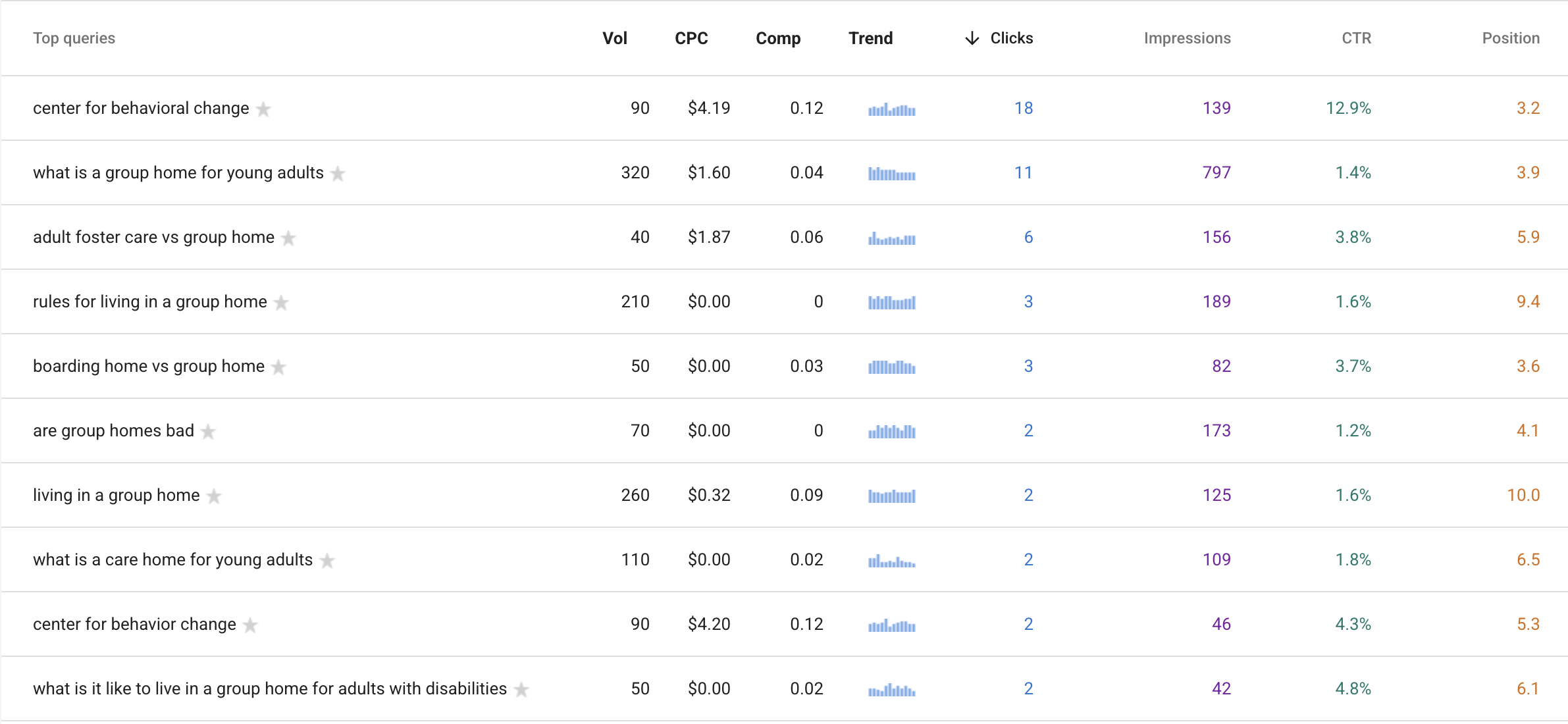
For example, a group home I work with wants to fill beds. Some of their highest volume keywords are things like “what is a group home” or “rules for living in a group home.” These bring traffic, but those people are usually still learning.
The real leads come from more specific or high-intent searches, like someone looking up the name of the facility, “group homes near me,” or “adult group home for disabilities in [city].” That’s someone actively looking for placement, not just information.
Where Keywords Everywhere Works
One of the best parts about Keywords Everywhere is that it works across multiple platforms, not just Google.
You’ll see keyword data on:
- Google Search
- YouTube
- Amazon
- Bing
- eBay
- Etsy
- Etc.
So if you’re writing blog content, creating videos, or listing products, you can see what people are searching for in each environment.
Can You Use It with AI Tools?
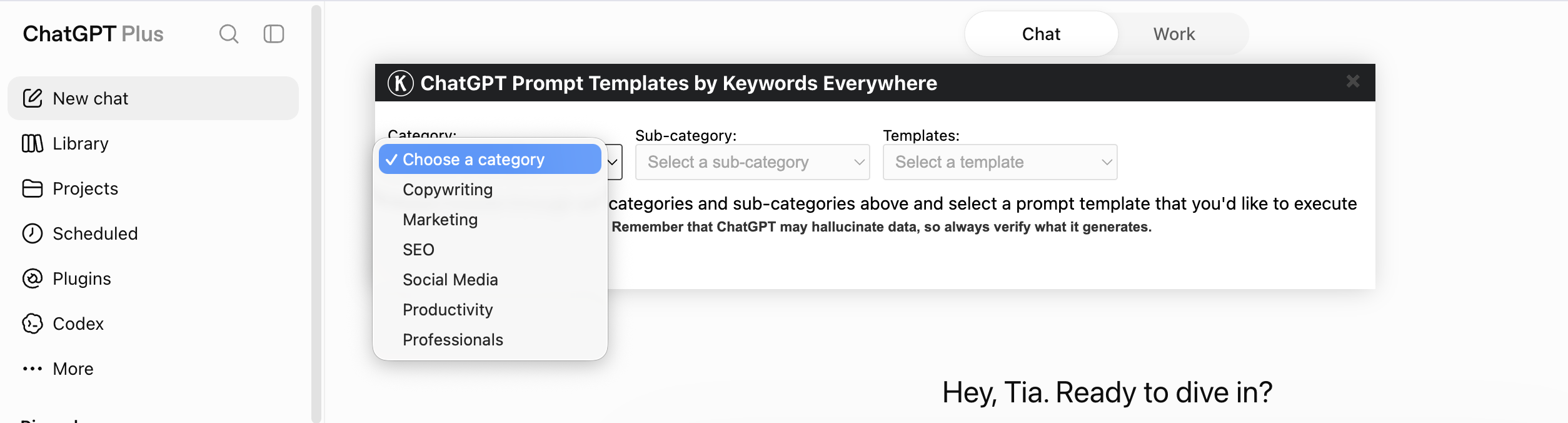
Yes, and this is where it gets really powerful.Keywords Everywhere doesn’t just work on Google or YouTube, it actually integrates directly inside ChatGPT.
As you can see above, it adds structured prompt templates you can use right away, organized by:
- Copywriting
- Marketing
- SEO
- Social Media
- Productivity
- Professional use cases
Then it goes even deeper. Within SEO alone, you can choose things like:
- Keyword Research
- Ecommerce SEO
- Local SEO
- On-Page Optimization
- Link Building
And from there, it gives you ready-to-use templates like:
- Optimize your Google Business Profile
- Generate Google Business posts
- Create Q&A content
- Turn existing content into posts
So instead of staring at a blank screen or guessing what to ask AI, you’re starting with structured prompts that are already aligned with real marketing use cases.
And when you combine that with keyword data, you’re not just generating content…
You’re creating content based on how people actually search.
What About Google Search Console and GA4?
Keywords Everywhere doesn’t replace tools like Google Search Console or GA4.
It works alongside them. Google Search Console shows you what’s already happening on your site.
Because of Keywords Everywhere, you can see below:
- Search volume (Vol): how many people are searching that term each month
- Cost per click (CPC): what advertisers are willing to pay for that keyword, which hints at its value
- Competition (Comp): how competitive that keyword is in paid search
- Trend: if interest in that keyword is growing, steady, or declining over time
This is real data from your site, not guesses.
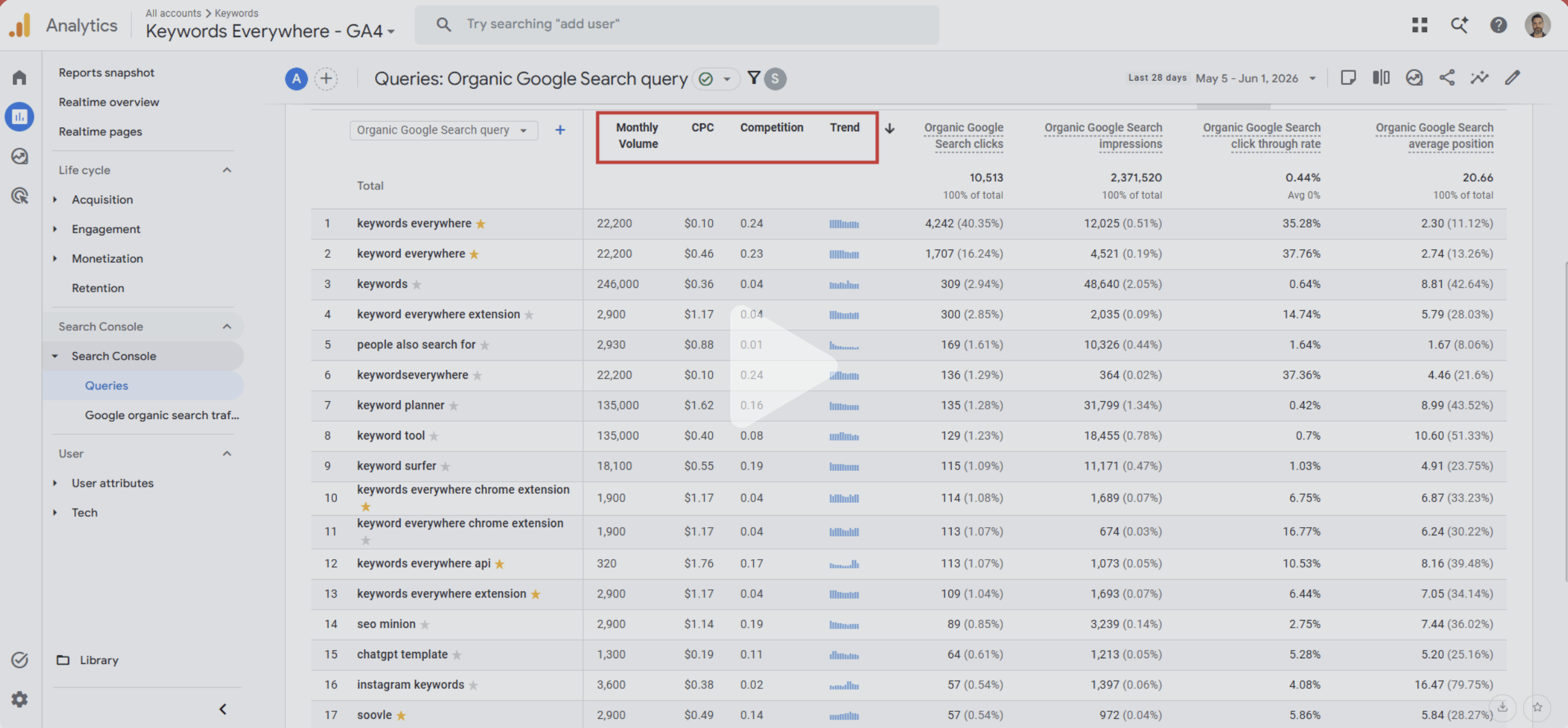
You can see in the screenshot that Keywords Everywhere shows the same data directly inside GA4, including monthly volume, CPC, competition, and trend.
GA4 then takes it a step further and shows you what happens after someone lands on your site, things like engagement, conversions, and user behavior.
Keywords Everywhere fits in earlier in the process.
It helps you decide what to create before you publish anything, by showing you real search demand upfront.
So together:
- Keywords Everywhere → What to target
- Search Console → What’s ranking and getting visibility
- GA4 → What’s actually converting
That’s how you go from guessing… to making decisions based on real data.
What Browsers Does It Work On?
Keywords Everywhere is available as an extension for:
- Google Chrome
- Firefox
- Microsoft Edge
Installation is simple and takes just a few minutes.
How Easy Is It to Install?
It’s very straightforward:
- Go to the Chrome Web Store (or your browser’s extension store)
- Search for “Keywords Everywhere”
- Click install
- Add your API key
Once it’s set up, you’ll start seeing data right away as you search.
How Much Does It Cost?
One of the reasons people like Keywords Everywhere is because it’s inexpensive compared to most SEO tools.
Instead of paying hundreds per month, it uses a simple credit-based system with flexible plans:
- Bronze – $7/month
- Silver – $14/month
- Gold – $40/month
- Platinum – $120/month
So if you’re just getting started or doing this regularly, there’s a level that fits. But the bigger issue most people are dealing with isn’t cost.
It’s this:
- “Why is my website not getting traffic?”
Or…
- “My website is not getting traffic”
- “I have no website traffic”
- “How do I get traffic to my website?”
And even deeper now:
- “How do I get AI results in Google Search?”
- “How do I show up in AI overviews?”
- “How do I get in ChatGPT?”
All of those questions lead back to the same problem. People are creating content based on guesses.
They’re not using real search data to understand what people are actually typing into Google, how search engine traffic works, or what kind of content brings in leads.
That’s where this tool changes things.
Keywords Everywhere shows you real search demand while you’re searching, so you can stop guessing and start creating content based on what people are actually looking for.
That’s how you:
- Get traffic to your website
- Turn that traffic into leads
- Understand what keywords bring in conversions vs just clicks
And once you start doing that consistently, you’re not just improving your website traffic.
You’re increasing your chances of showing up across Google, AI overviews, and even tools like ChatGPT.
Other Features (We’ll Cover These Separately)
While this article focuses on search volume, Keywords Everywhere does more than that.
It also offers:
Keyword suggestions
New keyword ideas based on what you searched, helps you find more topics to create content around.
Related keywords
Terms that are closely connected to your main keyword, often variations or similar phrases people are also searching.
People Also Search For data
Real searches that users look up after their initial query, gives insight into what they’re curious about next.
Trend data
Shows how interest in a keyword is changing over time, helps you see if something is growing, stable, or declining.
Competitor insights
Data on what other websites are targeting or ranking for, helps you understand what’s working in your space.
On-page analysis
Breakdown of a page’s SEO elements like keywords, headings, and content, helps you see how well a page is optimized.
Each of these deserves its own breakdown, which we’ll cover in separate posts.
Are There Tutorials or Help Resources?
Yes. Keywords Everywhere has a YouTube channel and help documentation that walks through:
- Setup
- How to read the data
- How to use it across platforms
If you’re new, those videos make it easy to get started quickly.
This Is Where Most People Get it Wront
Most people aren’t struggling because they can’t write content.They’re struggling because they’re creating content without knowing if anyone is actually searching for it.
That’s the gap. Keywords Everywhere helps you close it by showing you real search data while you’re working, so you’re not just hoping something works… you actually know.
Start Here
Once you install Keywords Everywhere, make your first search your own brand name. See if there’s any search volume behind it. See if people are actually looking for you.
If there’s little to no volume, that tells you something. If there is, that tells you something too.
Either way, it gives you a starting point.