
If you're a contractor who serves several cities, you don't need a physical office in every one of those cities to create useful pages about the services you provide there.
Let's say your HVAC company is based in Torrance, California, but you regularly work in Redondo Beach, Manhattan Beach and other nearby communities.
Your website doesn't have to rely on one sentence on the homepage that says:
"Serving Los Angeles and surrounding areas."
That's not giving potential customers much information about where you work, and it's not giving search engines much context either.
Instead, you can create useful pages around the actual services and areas your business serves.
For example:
- AC Repair in Redondo Beach
- HVAC Repair in Manhattan Beach
- AC Replacement in Torrance
This can give someone searching for a contractor in their city a page that's much more relevant to what they're looking for.
But there's a right way and a wrong way to approach this.
What Is a Contractor Service Area Page?
A service area page is a page on your website dedicated to a geographic area where you actually provide services.
It doesn't mean you have an office there.
If your HVAC company is located in Torrance but regularly sends technicians to customers in Redondo Beach, your website can explain the HVAC services you provide in Redondo Beach.
The same strategy can apply to many types of local service businesses.
- A plumber in Long Beach might have pages about plumbing services in Signal Hill or Lakewood.
- An electrician in Pasadena might serve customers in Altadena and South Pasadena.
- A roofer may have one physical office but work throughout several cities in the surrounding area.
Your website should help people understand where you work and what you do there.
You Don't Need an Office (Address) in Every City You Serve
This is an important distinction. Your website and your Google Business Profile aren't the same thing.
You may have one legitimate business location while your website contains pages explaining the services you provide throughout your actual service area.
- Don't create fake addresses.
- Don't claim to have an office somewhere you don't.
- And don't make your website look as though you operate multiple physical locations when you don't.
Your service area pages should simply communicate:
We provide this service in this area.
Don't Create 50 Nearly Identical City Pages
This is where contractors can get service area SEO very wrong.
The strategy isn't:
Create one page > duplicate it 50 times > change "Torrance" to "Redondo Beach," "Manhattan Beach," "El Segundo," "Gardena" and so on.
Now you've created dozens of pages that provide essentially the same information.
Instead, start with the cities you genuinely serve and actually want more business from.
Then ask yourself:
How can I make this page useful to someone looking for this service in this particular area?
What Should You Put on a Service Area Page?
Your page should contain more than a city name and a generic description of your company.
Depending on the service, you might include: Specific services you provide in that area
Tell people what they can actually hire you to do.
For an HVAC contractor, that might include AC repair, furnace repair, maintenance, heat pump services or system replacement.
- Neighborhoods or areas you regularly serve
- If there are communities or neighborhoods within the city where you regularly work, mention them naturally when they're relevant.
- Real projects you've completed nearby
- This is incredibly useful. Instead of simply claiming you work in Redondo Beach, show people.
- Explain a recent problem a homeowner had, what your company found and how you solved it.
- Photos from actual jobs
- Your own project photos can make the page substantially more credible than filling it with generic stock photography.
- Customer reviews from the area
- If a Redondo Beach customer has reviewed your work, that review makes sense on your Redondo Beach page.
- Common problems you encounter locally
- Different housing stock, climate conditions, building ages and other local factors can create different service needs.
- If there's something genuinely relevant to customers in that area, explain it.
- Frequently asked questions
- Answer the questions customers regularly ask about that service.
- A clear next step
- Someone shouldn't have to hunt around the website to figure out how to contact you. Give them a clear way to call, book an appointment or request a quote.
Use Keywords Everywhere to Research Local Searches
Before deciding which service area pages to create, look at how people are actually searching for your services.
Keywords Everywhere is a simple browser extension you can use while searching Google to see estimated search volume and discover related searches.
For example, an HVAC contractor might research:
- AC repair Redondo Beach
- HVAC repair Redondo Beach
- air conditioning repair Redondo Beach
- AC replacement Redondo Beach
- HVAC replacement Redondo Beach
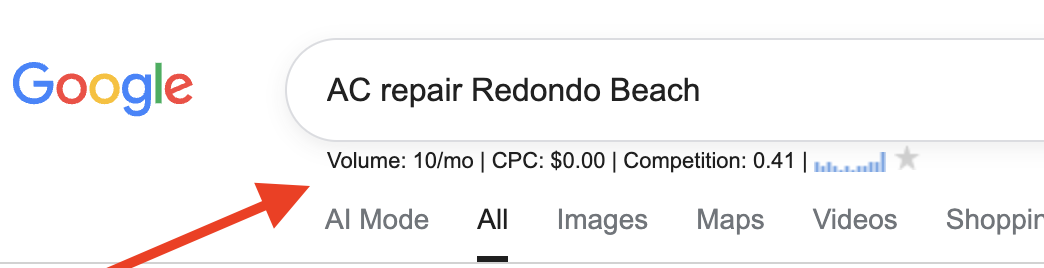
Pay attention to the search volume, but don't automatically choose the phrase with the highest number.
Also look at the related and long tail keywords Keywords Everywhere shows you. You may discover searches you hadn't considered.
Then Google the keywords you're considering and look at the actual first page results.
- Are other HVAC companies appearing?
- Are service pages similar to the page you're planning to create ranking?
- Does Google appear to understand the search as someone looking to hire an HVAC contractor?
If you're planning an AC Repair in Redondo Beach page, but the results for the keyword you're considering don't resemble the type of page you're creating, keep researching.
The goal isn't simply to find a keyword with search volume.
You're looking for a relevant search made by the type of customer you want, for a service you actually provide, in an area you actually serve.
Think About the Search Behind the Keyword
Now we can take this strategy a little further. Not every local search means the same thing.
Consider these two searches:
AC repair in Redondo Beach and AC replacement in Redondo Beach
They're both about air conditioning. They're both local. They could even come from the same homeowner.
But the person searching may be at a completely different point in the buying process.
Someone searching for AC repair in Redondo Beach may have a broken air conditioner and need someone as soon as possible.
Someone searching for AC replacement in Redondo Beach may already believe the system needs to be replaced.
That's potentially a very different job and a very different customer.
This is where understanding search intent becomes much more important than simply finding keywords.
You Don't Need a Separate Page for Every Keyword
Here's where I wouldn't go overboard.
Finding searches for:
- AC repair Redondo Beach
- air conditioning repair Redondo Beach
- AC service Redondo Beach
- air conditioner repair Redondo Beach
doesn't mean you automatically need four pages. Those phrases may represent essentially the same intent.
A strong AC repair page can naturally use appropriate terminology and answer the questions associated with that service.
Creating a separate page for every tiny keyword variation can leave you with a bloated website full of pages competing for very similar searches. You'll never rank in Google this way.
But Different Search Intent May Deserve Different Pages
Now consider:
AC repair in Redondo Beach versus: AC replacement in Redondo Beach
That's more interesting. You could have an AC repair page that explains the types of repairs you handle and discusses when repairing an aging system may no longer make financial sense.
From there, you can introduce your replacement service and link to a more detailed page about AC replacement.
Now you've created a useful path:
Customer searches for repair > Finds your repair page > Learns replacement may make more sense > Visits your replacement page > Requests an estimate
That's not just SEO. You're thinking about how someone moves from a Google search toward becoming a customer.
Don't Chase Search Volume Alone
Keyword research isn't about finding the phrase with the biggest number next to it.
- A broad HVAC keyword might receive thousands of searches.
- A specific service plus city search might receive substantially fewer.
That doesn't automatically make the smaller keyword less valuable.
Think about the difference between someone searching: air conditioner and someone searching: AC replacement Redondo Beach
The second search tells you a lot more about what that person wants.
For a local contractor, a smaller number of highly relevant searches from people in your service area can be much more valuable than a large number of broad searches.
Decide Which Services You Actually Want More Of
There's also a business decision behind your SEO strategy.
Don't create pages solely because a keyword research tool says people search for something.
Ask:
- Do we actually provide this service?
- Do we want more of these jobs?
- Is this a profitable service for us?
- Do we regularly work in this city?
- Does the search appear to come from someone who might hire us?
If AC replacement is a particularly valuable service for your HVAC company, I'd want to investigate the searches surrounding AC replacement in the cities you serve.
The same thinking applies to plumbers, electricians, roofers and other contractors.
A plumber might care considerably more about generating sewer line replacement jobs than attracting hundreds of visitors looking for DIY instructions for unclogging a sink.
Traffic isn't the goal.
Getting in front of potential customers for the services you want to sell is.
Start With the Cities You Actually Serve
You don't need to build dozens of pages at once.
Start with a few cities where you already work and where you'd like to generate more business.
Then research how people search for your services in those areas.
- Look at what Google currently shows for those searches.
- Look at the businesses you're competing against.
- Look at the type of pages that are ranking.
Then create something genuinely useful for the person who made that search.
Your website should eventually give Google and potential customers a much clearer picture than: "Serving Los Angeles and surrounding areas."
Tell them what you do, where you do it, and why someone in that community should consider calling you.
Want Help Applying This to Your Business?
Mastering P.O.P. is $249/month for ongoing, hands on digital marketing and SEO support.
We work on your actual business together, from your website and SEO to content, email marketing, lead generation, AI, automations, and conversions.
You'll have 365 day access to me through our private community, where you can ask questions, get feedback, and get help while you're actually doing the work. We also meet live on Zoom each week to review, troubleshoot, and work through your marketing together.
Think about what one new customer is worth to your business. If one customer is worth $249 or more, the bigger expense may be the leads and sales you're already losing because your marketing isn't working the way it should.
You don't need another course. You need someone helping you apply the right marketing to your business.