
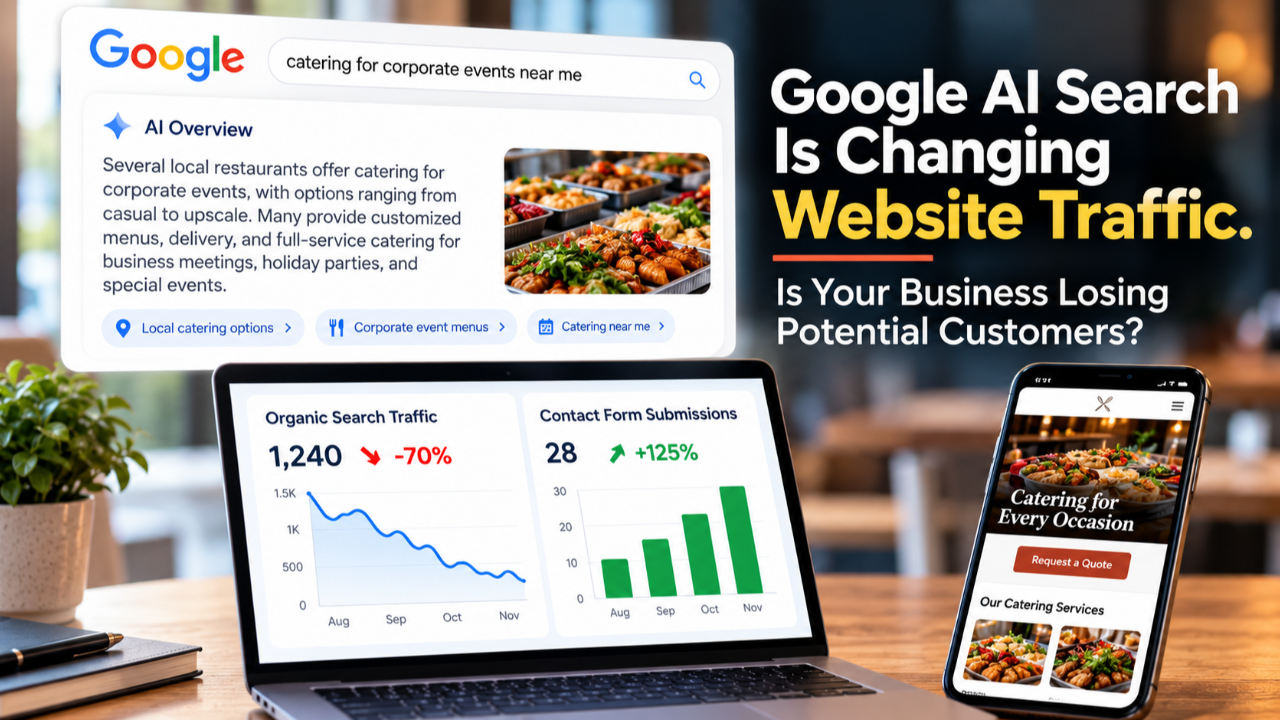
Google is making website links more visible in its AI search results. But if people get the answers they need without visiting your website, how does your business benefit?
Imagine someone searching Google for catering services for an upcoming corporate event. They want to know how much catering costs, what menu options are available, and which restaurants serve their area.
Instead of visiting several restaurant websites, they receive an AI-generated response summarizing information from different sources.
They read the answer, get some ideas, and continue with their day. But what about the restaurants whose websites provided some of that information?
Did the person visit their websites? Look at their catering packages? Submit an inquiry? Call to ask about availability? Maybe. Maybe not. And that's the concern.
For years, businesses have invested in search engine optimization (SEO), website content, and improving their Google rankings to attract potential customers.
Now, Google's AI-powered search features are changing how people interact with search results.
That doesn't mean SEO is no longer valuable. It means business owners need to pay closer attention to how their search visibility translates into website visits, customer inquiries, appointments, and sales.
Let's look at what's changing, what could be affecting your website traffic, and how to investigate what's happening with your business.
1. Google Is Answering Questions Before People Visit Websites
Google has introduced AI-powered search experiences, including AI Overviews and AI Mode.
An AI Overview may appear directly in Google search results, providing an AI-generated summary of information related to someone's question.
AI Mode allows people to ask more detailed questions, explore topics, and receive conversational responses.
For example, someone might search:
-
How much does catering cost for 50 people?
-
What's the difference between microcurrent and traditional facials?
-
How much does it cost to replace a water heater?
-
What should I look for when hiring a bookkeeper?
-
How do I choose the right dog blanket?
Previously, someone researching these questions might have clicked several websites to compare information.
Today, Google's AI features may provide much of that information directly within the search experience.
Google has also been making links to source websites more visible within its AI responses. That's potentially helpful for businesses and publishers whose information appears in those responses. But there's an important distinction.
Being mentioned or linked in an AI-generated answer doesn't guarantee someone will visit your website.
Someone may read the answer and feel they have enough information. Another person might click through because they want more details, need to compare options, or are ready to contact a business.
The challenge is understanding how these changing behaviors affect your business.
2. What Happens When Potential Customers Never Visit Your Website?
Let's use a restaurant as an example. Imagine a restaurant that offers catering, private event space, online ordering, and dine-in services.
Its website provides information about:
-
Catering menus and pricing
-
Corporate lunches and private celebrations
-
Event space availability
-
Online ordering
-
Restaurant locations and hours
Now imagine someone searching for "restaurants that cater corporate events in Inglewood." Google's AI response might summarize local catering options and provide links to restaurant websites.
But if the person doesn't click through, they may never see the restaurant's complete catering menu, inquiry form, event space photos, or ordering options.
That's a potential missed opportunity. The same situation can affect other industries.
- For a contractor: Someone researching roof replacement costs might receive a detailed AI-generated answer without visiting the contractor's website or requesting an estimate.
- For a beauty salon: Someone researching facial treatments might get an explanation of different procedures without visiting the salon's service pages or booking an appointment.
- For an online retailer: Someone comparing product features might receive enough information from Google to make a decision without visiting the store.
Of course, not every customer needs to visit a website to contact a business. A person might find a phone number through a Google Business Profile, request directions, or search for the business by name later. But those outcomes aren't guaranteed either.
AI visibility, website traffic, and customer acquisition are three different things. And businesses need to understand how they're connected.
3. Is Google's AI Responsible for Your Declining Website Traffic?
Before blaming AI search for a decline in website visitors, there's something important to understand.
Website traffic can increase or decrease for many reasons. AI-generated answers are one possible factor, but they're not the only explanation.
Your Google rankings may have changed
Suppose your plumbing company's website previously appeared near the top of Google for "water heater repair in Santa Monica." Now several competing businesses appear above you.
Even if the number of people searching hasn't changed, your website could receive fewer clicks because it's appearing lower in search results.
A decline in rankings can affect traffic, especially for searches that previously brought customers to your website.
Your competitors may be gaining visibility
Your competitors aren't standing still. They may be publishing new service pages, improving existing content, collecting customer reviews, expanding into additional service areas, or strengthening their online presence.
For example, a restaurant that previously attracted visitors searching for "corporate catering in Los Angeles" may face more competition from restaurants that have recently created dedicated corporate catering pages.
Competition can also come from advertisements, Google Maps listings, videos, and other search result features. The question isn't simply whether your website is still appearing on Google.
It's also who else is appearing alongside you and what they're offering potential customers.
People may be searching differently
Search behavior changes.
Someone who previously searched "best facial treatments" might now search "facials for sensitive skin in Bethesda" or ask an AI tool to compare specific treatments.
Someone researching a contractor might search by neighborhood, service type, emergency availability, or pricing.
People may also begin their research on YouTube, social media, Google Maps, or AI assistants rather than traditional Google search results. This doesn't mean every business needs to be active on every platform.
It means the words people use, the questions they ask, and the places they search can influence how they find your business.
Demand may be seasonal
A decline in traffic isn't always a marketing problem.
- A business selling holiday products might receive fewer visitors in January than in November.
- A restaurant may experience increased catering searches during graduation season or the holidays.
- A tax preparation business may receive more traffic during tax season.
Comparing one month with another without considering seasonal demand can lead to incorrect conclusions.
Google's search results may be attracting clicks elsewhere
Even if your website rankings remain relatively stable, the appearance of search results can change.
People might interact with:
-
AI Overviews
-
Google Maps and local business listings
-
Paid advertisements
-
Video results
-
Shopping results
-
Featured snippets
-
Other search features
Your website could still appear in Google, but fewer people may click through.
The point is that declining traffic is a signal to investigate, not proof that AI is taking your customers.
4. How to Investigate Traffic Changes Using Google Search Console
One of the first places I recommend business owners look is Google Search Console. It's a free Google tool that helps you understand how your website performs in Google Search.
If your website is already connected, you can start reviewing your search performance.
Step 1: Compare your performance
Open Google Search Console and select your website property.
Navigate to Performance > Search results.
Choose a date comparison, such as the last three months versus the previous three months.
Look at four measurements:
- Total clicks: How many clicks your website received from Google Search.
- Total impressions: How often your website appeared in Google Search results, according to Google's reporting rules.
- Average click-through rate (CTR): The percentage of impressions that resulted in clicks.
- Average position: The average position of your website's reported search appearances.
These numbers can help you identify changes worth investigating.
Step 2: Look at impressions and clicks together
Imagine your Search Console report shows:
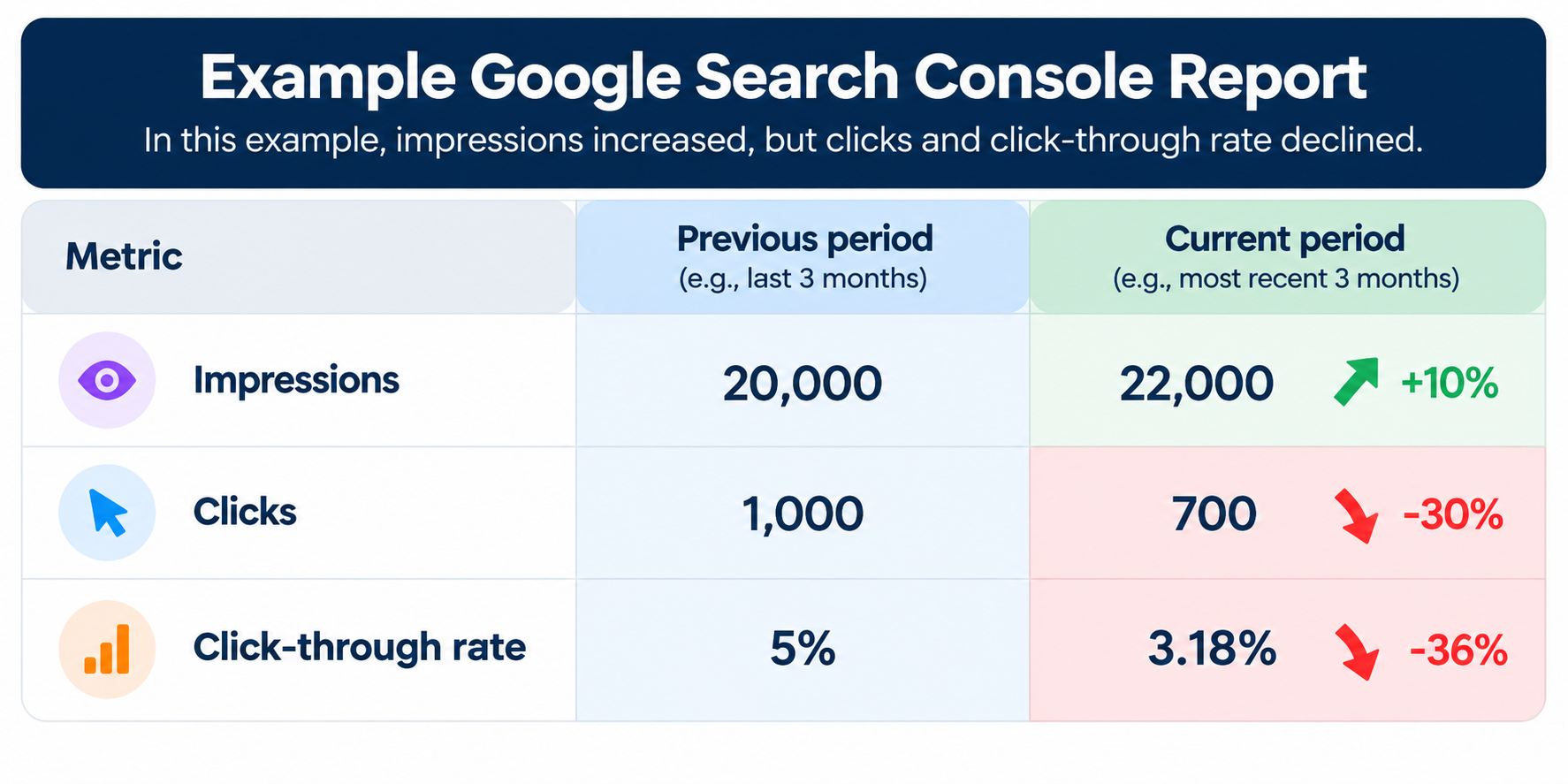
Hypothetical example.
Your website appeared in Google more often, but received 300 fewer clicks. That deserves attention.
- Are people seeing your website but choosing other results?
- Has your average ranking changed?
- Are AI-generated answers satisfying some searches before people click?
- Are competing websites offering more appealing information?
You can't determine the cause from these three numbers alone, but they give you a starting point.
Step 3: Review the actual searches
Within the same Search Console report, select the Queries tab. This shows search terms associated with your website's appearances in Google.
Look for searches where clicks have declined. For example, a restaurant might find that clicks for "catering menu ideas" declined while clicks for "corporate catering Inglewood" increased.
Those searches represent different customer intentions.
- Someone researching catering ideas may be gathering information.
- Someone searching for a catering company in a specific city may be closer to contacting a business.
Both audiences can be valuable, but they may contribute to your business differently.
Step 4: Identify which pages are losing traffic
Select the Pages tab.
Look at the pages that previously received clicks and compare their current performance.
- Are your service pages losing traffic?
- Are your blog articles receiving fewer clicks?
- Are your product pages still attracting visitors?
If your catering page is losing clicks, that's potentially more concerning than a decline on an informational article that rarely generated inquiries.
However, don't automatically dismiss informational content. Someone who reads an educational article today could become a customer weeks or months later.
Can Search Console tell you exactly how much traffic you lost to AI?
Not completely. Google includes eligible AI Overview and AI Mode activity within its broader Search Console performance reporting, but doesn't provide a comprehensive separate breakdown that identifies every click and impression from those experiences.
That means you shouldn't assume every decline in click-through rate is caused by AI. Use Search Console to identify changes, then investigate possible explanations.
Step 5: You Found Pages Losing Clicks. Now What?
Before changing your website, investigate what's causing the decline.
1. Check your rankings and competition.
Did your average Google position drop? Search the affected keywords and examine which websites now appear above yours. What information are they providing that yours may be missing?
2. Investigate changes in click-through rates.
If your rankings are relatively stable but clicks are declining, look at Google's search results. Are AI answers, ads, maps, or other features competing for attention? These may be contributing factors, not necessarily the cause.
3. Review the affected pages.
Does the content still match what people are searching for? Is the information current? Can visitors easily find your products, services, and contact information?
4. Look beyond Google Search Console.
Check Google Analytics 4 to see if those pages are still attracting visitors who submit inquiries, book appointments, or make purchases. These actions require appropriate tracking.
Your next step: Choose one important page that has lost clicks. Identify a possible cause, make an improvement supported by your findings, and monitor the results.
Don't change your website simply because clicks declined. Understand what's happening first.
What should you do first?
Choose one important page that has lost clicks. Review its rankings, search queries, competing results, and visitor activity.
Then identify one improvement supported by what you've found and monitor its performance over time.
Remember: A decline in clicks doesn't automatically mean your content needs to be rewritten. First, understand what changed.
6. People Are Visiting Your Website. Do You Know What They're Doing?
Let's move beyond search rankings and website traffic.
Imagine two businesses.
- Business A receives 2,000 website visitors each month.
- Business B receives 800.
Which business is performing better? You can't answer that question from visitor numbers alone.
What if Business A receives 10 customer inquiries, while Business B receives 35? Now the conversation changes.
Business B is converting a higher percentage of its visitors into inquiries.
That doesn't mean Business A should be happy with fewer visitors or stop trying to increase traffic.
It means both businesses need to understand what happens after someone reaches their website.
Getting someone to visit your website is an opportunity. What they do next helps determine the business value of that visit.
This is where Google Analytics 4 (GA4) and event tracking become valuable.
7. What Is GA4 Event Tracking, and Why Should You Care?
Google Analytics 4 can measure how people interact with your website. Some interactions are collected automatically or through enhanced measurement settings. Others require additional configuration.
These interactions are called events. For example, GA4 can help you understand how many people visit a page, which pages they view, and certain actions they take.
But what about the interactions that directly relate to customer inquiries and sales? Let's look at several examples.
Phone number clicks
Imagine someone visits a contractor's website and clicks the displayed phone number. With appropriate tracking, GA4 can record that click. You can then investigate which pages and marketing channels are generating phone clicks. But there's a limitation.
A phone click doesn't prove someone completed a call or became a customer.
For actual call outcomes, additional call tracking or business records may be necessary.
Email address clicks
Suppose someone visits a service provider's website and clicks the email address to contact the business.
GA4 can track that interaction when properly configured. This helps measure how often visitors attempt to contact the business by email.
However, clicking an email address doesn't prove the person sent a message.
Contact form submissions
This is one of the most valuable interactions to measure for service businesses.
Someone visits your website, completes a contact form, and successfully submits an inquiry.
With correctly implemented tracking, GA4 can record the successful submission.
Now you can investigate:
-
Which pages generate inquiries?
-
Which traffic sources bring visitors who submit forms?
-
Are inquiries increasing or decreasing?
-
Which services generate the most interest?
For example, a restaurant could track catering inquiries separately from private event inquiries.
That would provide a clearer picture of which services are attracting potential customers.
Appointment and booking button clicks
- A beauty salon might have a "Book Appointment" button.
- A contractor might have a "Request an Estimate" button.
- A consultant might offer a "Schedule a Consultation" link.
Tracking those clicks can show how often visitors attempt to take the next step. But if the booking happens on another platform, a button click alone won't confirm that the appointment was completed.
Completed bookings should be measured separately when the booking platform supports it.
Online ordering clicks
Imagine a restaurant has an "Order Online" button that sends customers to Uber Eats or another ordering service.
GA4 can measure clicks to that external ordering platform. But it generally cannot tell you whether someone completed the purchase unless additional purchase data or a supported integration is available. For that, the restaurant may need to review its ordering platform's reports.
This distinction is important because interest in ordering and completed orders are not the same thing.
8. What About People Who Start a Form but Never Finish?
This is one of the most interesting opportunities for businesses that collect leads through their websites.
Imagine a restaurant receives 1,000 website visitors in one month.
Of those visitors:
-
100 visit the catering inquiry page.
-
95 start filling out the catering form.
-
Only 10 successfully submit an inquiry.
That means 85 form starts did not result in a recorded submission. Assuming the tracking is accurate, those 85 incomplete submissions deserve investigation.
Why did those people stop?
- Maybe the form requested too much information.
- Maybe it wasn't easy to complete on a mobile phone.
- Maybe the customer wanted to know pricing before providing their contact details.
- Maybe something wasn't working correctly.
Or maybe they were simply comparing options and weren't ready to submit an inquiry.
Event tracking doesn't automatically tell you why someone abandoned a form. But it can show where people stopped progressing.
How form tracking works
Depending on your website platform and form technology, you may be able to track:
- Form starts: When someone begins interacting with a form.
- Successful submissions: When a form has actually been submitted successfully.
- Incomplete forms: When a form start doesn't result in a recorded submission during the measurement period or defined session.
Some forms require additional setup to track these interactions reliably.
A popup form, an embedded form, and a form hosted on another platform may all behave differently. And GA4's automatically collected form interactions aren't always sufficient to confirm successful lead submissions.
That's why tracking should be tested rather than assuming every recorded form event represents a real inquiry.
How does this connect to AI search?
Suppose that same restaurant experiences a decline in organic website traffic. If fewer potential customers are reaching its catering pages, the restaurant has fewer opportunities to generate inquiries through those pages.
Understanding how existing visitors interact with its forms becomes even more valuable. The business might not be able to control how Google displays AI answers, but it can investigate problems on its own website.
Improving a form won't automatically replace traffic lost from Google. However, it may help the business convert more of the visitors who still arrive.
9. Don't Confuse Website Activity With Actual Sales
This is another area where businesses can misinterpret their marketing performance.
Consider the following interactions:
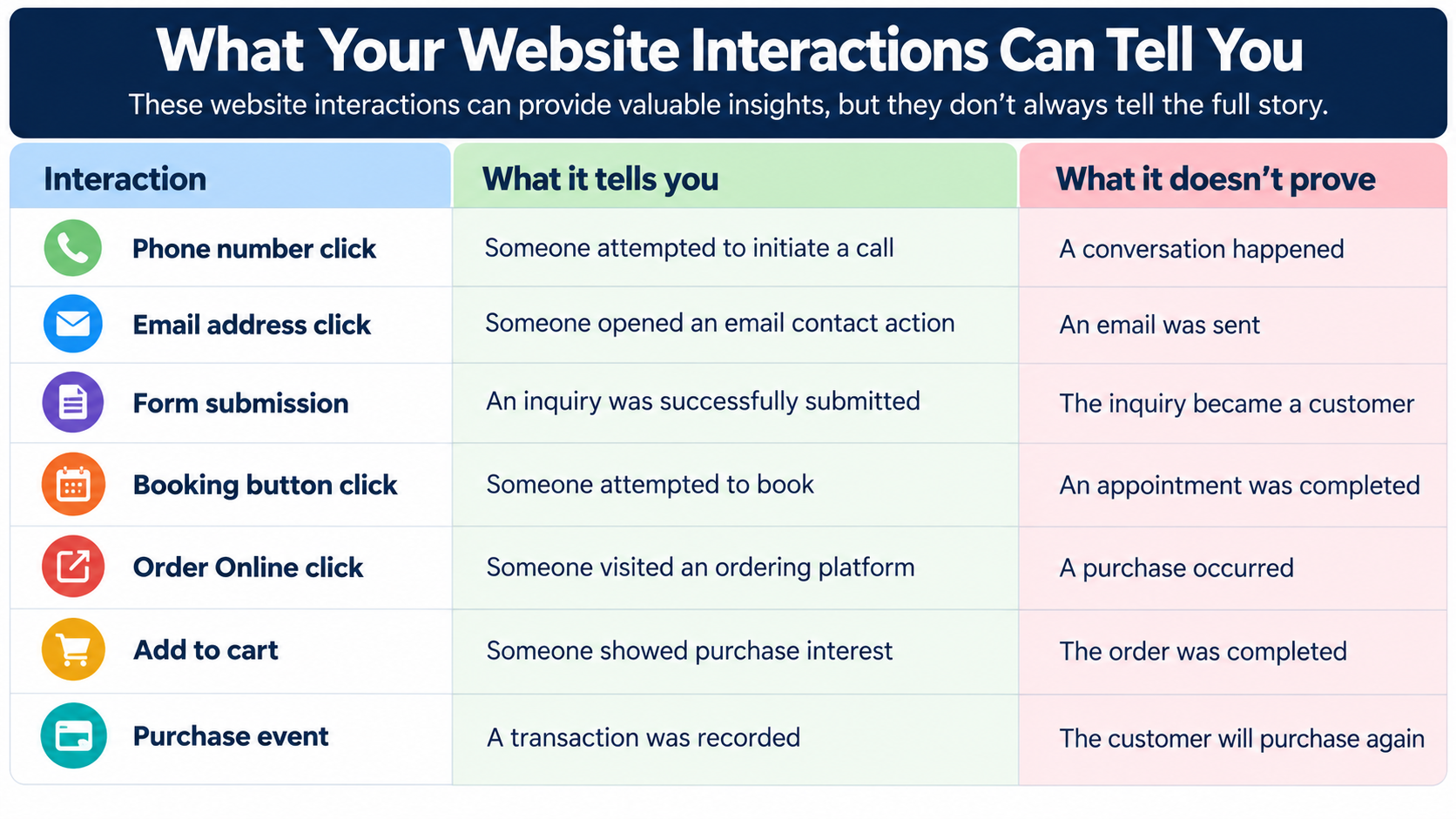
Business owners should understand the difference between someone showing interest and someone actually becoming a paying customer.
For example, a catering company might receive 30 inquiries in one month. But how many became confirmed catering orders?
- What was the average order value?
- How much revenue did those orders generate?
GA4 may measure the inquiries, but completed sales often need to be connected with information from a CRM, booking system, point-of-sale system, or internal sales records.
That's how businesses can begin evaluating which marketing efforts contribute to revenue rather than looking only at traffic and clicks.
10. What Can You Do to Improve Your Business's Visibility in Google and AI Search?
There is no guaranteed method for making Google feature your business in an AI-generated response. But there are several areas worth reviewing.
Make your service and product pages genuinely helpful
Someone considering your business should be able to understand what you offer without searching through multiple pages.
- A catering company might explain the types of events it serves, menu options, minimum order requirements, delivery areas, and how to request a quote.
- A contractor might explain its services, service areas, project process, licensing information, and how customers can request estimates.
- A beauty salon might explain its treatments, who they're appropriate for, appointment information, and pricing when available.
Give potential customers the information they need to evaluate your business.
Pay attention to the searches that indicate customer intent
Not every keyword serves the same purpose. Compare these searches:
- "How does microcurrent facial treatment work?"
- "Microcurrent facial treatment near me"
The first search suggests someone wants information. The second suggests someone may be looking for a provider. Both can support your marketing, but they serve different stages of the customer journey.
Businesses should understand which searches bring visitors who are researching and which attract people actively looking for products or services. That doesn't mean abandoning educational content.
Informational articles can help introduce your business, demonstrate your knowledge, and support future purchasing decisions.
Keep your Google Business Profile accurate
For businesses eligible for a Google Business Profile, accurate business information can help customers find and contact them through Google Search and Maps.
Review your:
-
Business name, address, and phone number
-
Business hours
-
Website link
-
Services or products
-
Business categories
-
Photos
-
Customer reviews
Customers may interact with your business listing without visiting your website. That's another reason website traffic alone doesn't capture every potential customer interaction.
Give people a reason to visit your website
If an AI-generated answer provides general information, what additional value does your website offer?
Maybe it's your complete product selection. Maybe it's your catering menu, pricing, customer reviews, project photos, appointment availability, or detailed service information.
For a local service business, the ability to contact someone, request an estimate, or schedule an appointment can be a compelling reason to visit.
Your website shouldn't simply repeat information people can find anywhere. It should help them evaluate your business and take the next step.
Make it easy for visitors to contact you
Look at your website from a potential customer's perspective.
- Can they quickly find your phone number?
- Is your contact form easy to complete?
- Can they request an appointment from their phone?
- Are your service areas clearly identified?
- Can customers find ordering or booking information without searching through multiple pages?
These improvements may not directly increase your Google rankings or AI visibility. But they can help visitors take action once they arrive.
11. What If Your Website Traffic Hasn't Declined?
You don't have to wait for a traffic problem before paying attention. In fact, now is a good time to understand how your website is performing.
Start by establishing a baseline. Review your current organic search traffic, most visited pages, important search queries, and customer inquiries. Identify which pages generate meaningful actions.
If you're not tracking contact form submissions, phone clicks, appointment requests, or purchases, investigate what needs to be configured.
That way, if your website traffic changes in the future, you'll have historical information to compare. You'll be in a better position to determine what changed and where to investigate.
12. A Monthly Website Performance Review Every Business Owner Can Do
You don't need to spend hours reviewing reports every day. Start with a monthly review.
In Google Search Console
-
Compare your most recent complete month with the previous month and, when useful, the same month last year.
-
Review changes in impressions, clicks, and click-through rates.
-
Identify important search queries gaining or losing clicks.
-
Check which service, product, and informational pages experienced changes.
-
Review average positions and investigate meaningful ranking changes.
In Google Analytics 4
-
Review organic search traffic and compare it with previous periods.
-
Identify the landing pages receiving visitors.
-
Review important events such as form submissions, phone clicks, and booking interactions.
-
Check which pages and traffic sources contribute to inquiries or purchases.
-
Compare form starts with successful submissions, if both are being tracked reliably.
In Your Business Records
-
How many inquiries became actual customers?
-
How many appointments or bookings were completed?
-
How many orders or sales were generated?
-
Which services or products brought in the most revenue?
-
Are customer inquiries increasing or decreasing?
You may not have every tracking system connected immediately. That's okay. Start with the information you have, identify what's missing, and improve your measurement over time.
The objective is to understand how people find your business, what they do when they reach you, and which interactions contribute to actual business results.
13. Google's AI Search Changes Are Worth Watching, but Don't Lose Sight of Your Customers
Google is continuing to change how information appears in search results.
AI-generated answers, more prominent source links, and changing search behavior can all influence how people interact with businesses online. But AI isn't the only factor affecting website traffic.
Your rankings, competitors, content, seasonal demand, and customer search behavior also play a role. That's why I wouldn't recommend reacting to every traffic decline by immediately changing your website or publishing more content.
First, investigate what's happening.
- Are fewer people searching for your services?
- Are your rankings declining?
- Are competitors attracting more attention?
- Are people seeing your website in search results but clicking less frequently?
And when visitors do arrive, are they contacting you, requesting quotes, booking appointments, or purchasing?
Getting found on Google is important. Getting people to visit your website is important. And turning those opportunities into customers is what ultimately supports business growth.
Google Search Console helps you understand how people find your website through Google Search. Google Analytics 4 helps you understand what visitors do after arriving.
Your business records help you understand which inquiries and interactions become paying customers. Together, they provide a more complete picture than rankings or website traffic alone.
Here's Something You Can Do This Week
Open Google Search Console and Google Analytics 4.
Choose one important page on your website, perhaps your most popular service page, a product page, or your contact page.
Ask yourself: How are people finding this page, how many are visiting it, and what actions are they taking once they arrive?
If you can't answer all three questions, you've identified a good place to start improving your website measurement.
Because as Google continues changing how people search, businesses need more than visibility.
They need to understand how that visibility turns into customer opportunities.
Schedule a One-on-One Marketing Strategy Session for $249.
During our first call, we'll review your website, discuss your marketing goals, and identify opportunities to improve your traffic, leads, and conversions.
You'll walk away with:
-
A personalized list of your next marketing action items.
-
Recommendations for tracking important website interactions.
-
Getting the necessary access to your Google Analytics 4, Google Tag Manager, and website. If you don't already have GA4 or Google Tag Manager accounts, we can set them up together during our call. All you'll need is access to the Gmail account you'd like associated with both platforms.
-
A second follow-up call to review your tracking setup, explain what the data tells you, and discuss your next steps.
Our goal is to help you understand how people find your business, what they do on your website, and where you may be losing potential customers.