SEO can get technical, but some of the most important things you can do are actually pretty simple.
When you optimize a page on your website, you're helping search engines like Google understand what that specific page is about so they can determine when it may be relevant to someone searching.
That page could be for a service you offer, software you sell, an area you serve, a resource you've created or a blog post answering a potential customer's question.
Before you optimize anything, though, you need to know what people are actually searching for.
Start With Keyword Research
One of the biggest mistakes you can make is assuming you know exactly what your potential customers type into Google.
Research it.
I use several keyword research tools. SEMrush is one of my paid SEO platforms, while Keywords Everywhere is one of my favorite browser extensions because it's affordable and relatively easy for someone new to SEO.
Let's say you're a business consultant.
You might find:
- business consultant: 60,500 searches/month
- business consultant services: 9,900 searches/month
- small business consultant: 4,400 searches/month
- business strategy consultant: 2,900 searches/month
- business growth consultant: 2,400v
It might be tempting to immediately target “business consultant” because it has the most searches.
But bigger isn't always better.
Get More Specific About What You Actually Do
“Business consultant” is extremely broad.
- What kind of business consultant are you?
- Who do you help?
- What do you help them accomplish?
You might actually be a:
- Small business consultant
- Business growth consultant
- Business strategy consultant
- Restaurant business consultant
- SaaS business consultant
- Law firm business consultant
- Startup business consultant
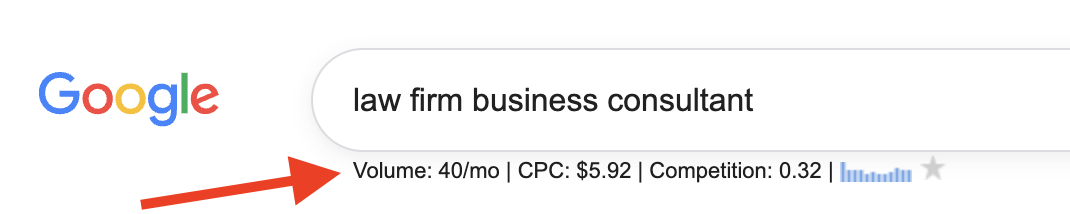
The more specific search may have considerably less search volume, but the person searching it could be much closer to the type of client you actually want.
Think about the difference between someone searching:
- business consultant
and:
- law firm business consultant
The second person has already told you quite a bit about what they're looking for.
That's why I don't recommend choosing keywords based on search volume alone.

Relevance and search intent matter.
I'd rather have the right 100 people finding a page than thousands of people arriving who aren't looking for what I offer.
Page Title
Your page title is the main title someone sees when they arrive on the page. If the page is about a specific service, the title should make that clear.
Let's say your keyword research showed that “business growth consultant” accurately describes what you do and the clients you want to attract.
- Instead of: How We Can Help
- You might use: Business Growth Consulting Services
Or, depending on what the research shows and how you position the service:
- Business Growth Consultant for Small Businesses
Now both the person visiting the page and search engines have much more context about what you actually offer.
Don't be vague just for the sake of being creative. Make it easy to understand what the page is about.
URL and Slug
The URL is the web address for the page.
The slug is the portion identifying that particular page.
For example: yourwebsite.com/business-growth-consultant
The words business-growth-consultant make up the slug.
Compare that with: yourwebsite.com/services/service-1
The first URL gives people and search engines a much clearer idea of what they'll find on the page.
When possible, use your primary keyword in the URL, but keep it short, descriptive and easy to understand.
Don't change URLs on existing pages just to add a keyword without knowing how to properly redirect the old URL. Changing an established URL can create SEO problems if it's not handled correctly.
Title Tag
The title tag is the SEO title associated with the page and can appear as the clickable headline in Google's search results.
For example, if your primary keyword is “business growth consultant,” your title tag might be:
- Business Growth Consultant for Small Businesses | Company Name
Your primary keyword should usually appear naturally in the title tag, preferably without unnecessary words getting in the way.
Remember, you're not only communicating with Google. A real person may see your title alongside several other search results and decide which one is most relevant to what they're looking for.
Meta Description
The meta description is the short description that may appear underneath your title in Google's search results.
This gives you additional room to describe what you offer, incorporate relevant keyword variations or modifiers, and give someone a reason to click.
For example: Looking for a business growth consultant? Get practical business strategy and growth consulting for small businesses ready to grow.
Notice that we aren't simply repeating “business growth consultant” several times.
We're naturally introducing related terms such as business strategy, growth consulting, and small businesses that provide additional context about the service.
Your meta description should be written for the person searching first, while still helping search engines understand what the page is about.
Header Tags
Headers organize the information on your page.
Your primary heading is generally your H1, while sections underneath can use H2s and H3s.
For a business consulting page, H2s might include:
- Business Consulting Services We Offer
- Who Our Consulting Services Are For
- How Our Business Consulting Process Works
- Frequently Asked Questions
Notice what's happening.
We're naturally giving Google more context about the service without repeating "business consultant" in every heading.
The same concept applies if you're an agency, coach, SaaS company, insurance professional, accountant or another service provider.
Image File Names
Image optimization is easy to overlook.
Before uploading an image with a generic filename like: IMG_72849.jpg
rename it so the filename describes the image and, when appropriate, relates to the topic of the page.
For example: business-growth-consultant-client-meeting.jpg
That's much more descriptive than a random string of letters and numbers and gives search engines additional context about the image.
Keep filenames short and descriptive, and separate words with hyphens.
Image Alt Text
Alt text describes an image and is primarily used for accessibility, including helping people who use screen readers understand what's pictured.
Your alt text should describe the actual image.
For example, if the image shows a consultant meeting with a small business owner:
- Business growth consultant meeting with a small business owner
If your primary keyword naturally describes the image, great. Use it. But don't force a keyword into the alt text just because you're optimizing the page for that keyword.
The description should make sense to someone who can't see the image.
Content Body
This is where you actually explain the service and give potential clients enough information to understand what you offer.
Don't create a service page with 100 words just so you can say you have one.
If your page targets people looking for a business growth consultant for small businesses, think about what that person would want to know before contacting you:
- What exactly do you help small businesses with?
- What types of businesses do you work with?
- What growth challenges do you help solve?
- What does your consulting process look like?
- Do you specialize in certain industries?
- What can someone expect when working with you?
- How do they get started?
Answering real questions gives you natural opportunities to use your primary keyword, keyword variations, related terminology and the same language potential clients use when searching.
You may naturally talk about business growth strategies, small business consulting, business strategy, increasing revenue, customer acquisition or other topics directly related to the service.
You're giving Google more context about the page while creating something genuinely useful for someone considering hiring you.
Don't Over Optimize Your Page
This is where SEO can go sideways.
If your primary keyword is business growth consultant, you don't need to write:
- Looking for a business growth consultant? Our business growth consultant helps businesses looking for a business growth consultant find the right business growth strategies...
That's not good optimization. That's keyword stuffing.
Use your primary keyword where it makes sense. Use relevant variations and related language where they make sense. Then write naturally for the person you're trying to reach.
You don't need to hit some magical number of keyword mentions.
Google needs enough context to understand what your page is about. Your potential customer needs enough useful information to decide if you're someone they should contact.
Watch Out for Keyword Cannibalization
You also don't need to create a separate page for every keyword variation you discover.
For example, you might find searches for:
- business growth consultant
- business growth consulting
- business growth consulting services
- small business growth consultant
That doesn't automatically mean you need four different pages.
If those searches have similar intent and describe the same service you offer, one strong, well optimized page may make more sense.
Before creating another page, ask yourself: Is this actually a different service or search intent, or is it just another way of searching for the same thing?
Creating several nearly identical pages targeting essentially the same search can cause your pages to compete with one another.
On the other hand, if you offer something genuinely different, such as restaurant business consulting and SaaS business consulting, separate pages could make sense if each page serves a distinct audience and contains genuinely different, useful information.
Simple On Page SEO Formula
Once you've done your keyword research and identified the primary keyword for the page, here's a basic framework:
- Page title: Primary keyword or natural variation
- URL/slug: Primary keyword
- Title tag: Primary keyword + relevant modifier when appropriate
- Meta description: Primary keyword + relevant variation/modifier + reason to click
- H1: Primary keyword or close variation
- H2s/H3s: Relevant variations, related terminology and questions
- Image file names: Descriptive terminology related to the actual image
- Image alt text: Accurately describe the image
- Content: Primary keyword + natural variations + related terminology + genuinely useful information
And always remember:
No keyword stuffing. No unnecessary repetition. No creating a bunch of pages just to target tiny variations of the same search.
Want Help Applying This to Your Business?
Mastering P.O.P. is $249/month for ongoing, hands on digital marketing and SEO support.
We work on your actual business together, from your website and SEO to content, email marketing, lead generation, AI, automations, and conversions.
You'll have 365 day access to me through our private community, where you can ask questions, get feedback, and get help while you're actually doing the work. We also meet live on Zoom each week to review, troubleshoot, and work through your marketing together.
Think about what one new customer is worth to your business. If one customer is worth $249 or more, the bigger expense may be the leads and sales you're already losing because your marketing isn't working the way it should.
You don't need another course. You need someone helping you apply the right marketing to your business.