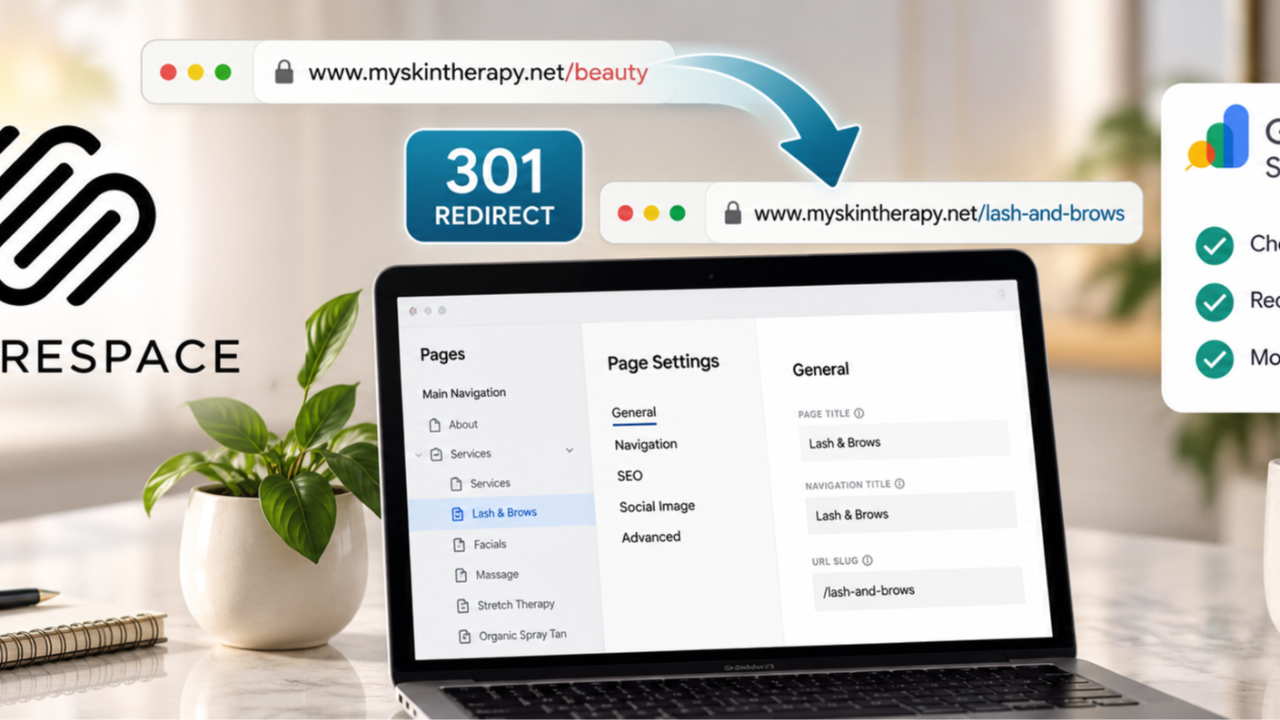
How broken links, 301 redirects, and Google Search Console affect your website's traffic and search visibility.
Have you ever changed the URL of a page on your website? Maybe you renamed a service, updated your products, reorganized your website, or realized that the original page URL didn't accurately describe what you were offering.
Changing a page URL might seem like a small adjustment. After all, it's just a few words in the website address, right? Not exactly.
When you change a page URL without properly redirecting the old one, you could be sending potential customers to a page that no longer exists.
And if that old URL is already appearing in Google search results, linked from another website, or saved in someone's bookmarks, you could be losing visitors without even realizing it.
Let's walk through a recent example involving a wellness spa we work with, what we changed, and how business owners can handle this correctly on Squarespace and other website platforms.
A Real Example: Changing a Beauty Page to Lash & Brows
We recently worked on a website for a wellness spa that offers a variety of beauty and wellness services.
One of the pages was titled "Lash & Brows," but its URL was: myskintherapy.net/beauty
The problem? The page wasn't about general beauty services. It specifically featured lash and eyebrow treatments, including brow lamination, lash lifts, brow tinting, and other related services.
We wanted the page's URL, title, navigation label, and SEO information to better reflect the services customers were actually looking for.
So we changed the URL to: myskintherapy.net/lash-and-brows
That new URL is much more descriptive. Someone looking at it can immediately understand what the page is about. But changing the URL was only one part of the process.
[IMAGE 1: Insert the screenshot showing the original Lash & Brows page with /beauty in the browser address bar and the navigation menu highlighted.]
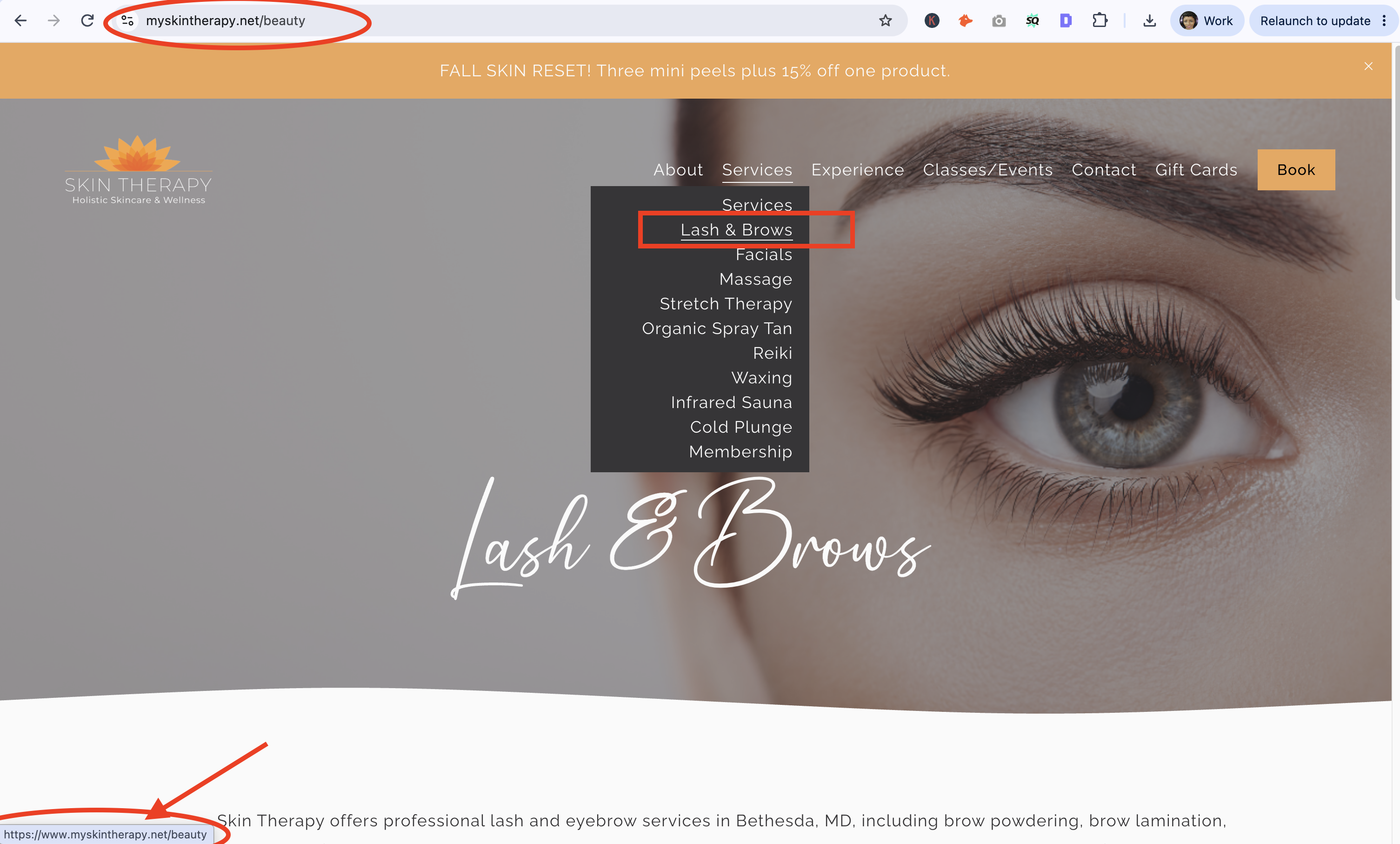
Caption: Although the page was labeled Lash & Brows, its original URL was /beauty, which didn't accurately describe the services featured on the page.
What Happens When You Change a Page URL?
Think about what happens when someone finds your business on Google. They search for a service, see one of your pages in the search results, and click on it.
Now imagine that Google still has your old URL listed, but you've already changed the address on your website.
If you haven't set up a redirect, that visitor could land on a 404 error page instead of the information they expected.
What Is a 404 Error?
A 404 error means the server couldn't find the page someone requested.
You've probably seen messages like: "404 Page Not Found"
"This page doesn't exist." "Sorry, we couldn't find what you're looking for."
For a business owner, this can create several problems. Someone looking for your services might leave your website rather than search for the correct page.
A potential customer who was ready to book an appointment, make a purchase, or submit an inquiry could be lost.
And if Google continues finding broken URLs that previously contained valuable content, those old URLs may eventually disappear from its search results.
Not every 404 is a problem. Sometimes pages are intentionally removed because the products or services no longer exist. But when you've simply moved or renamed a page, there's a better solution.
What Is a 301 Redirect?
A 301 redirect tells browsers and search engines that a page has permanently moved to a new address. Think of it like forwarding your mail when you move to a new location.
Instead of someone visiting your old address and finding nothing there, they're automatically directed to your new address.
For our wellness spa example: Old URL: /beauty and New URL: /lash-and-brows
We created this redirect in Squarespace: /beauty -> /lash-and-brows 301
Now, when someone visits the old URL, Squarespace can automatically send them to the new Lash & Brows page.
They don't need to search for it, click another link, or figure out where the information went.
Why Are 301 Redirects Important for SEO?
A properly implemented 301 redirect helps Google understand that the original page has permanently moved.
It also helps preserve ranking signals associated with the old URL, including signals from links pointing to that page.
That doesn't mean rankings are guaranteed to remain exactly the same. Google still evaluates the new page's content, relevance, and other ranking factors. But a redirect provides a much better transition than allowing an old URL to become a dead end.
How We Changed the Page URL in Squarespace
For this wellness spa, we started by opening the existing page in Squarespace.
Under Page Settings, we found the URL Slug field.
The original slug was: /beauty
We changed it to: /lash-and-brows
We kept the existing page published, so the business didn't lose its page content or need to create an entirely new page.
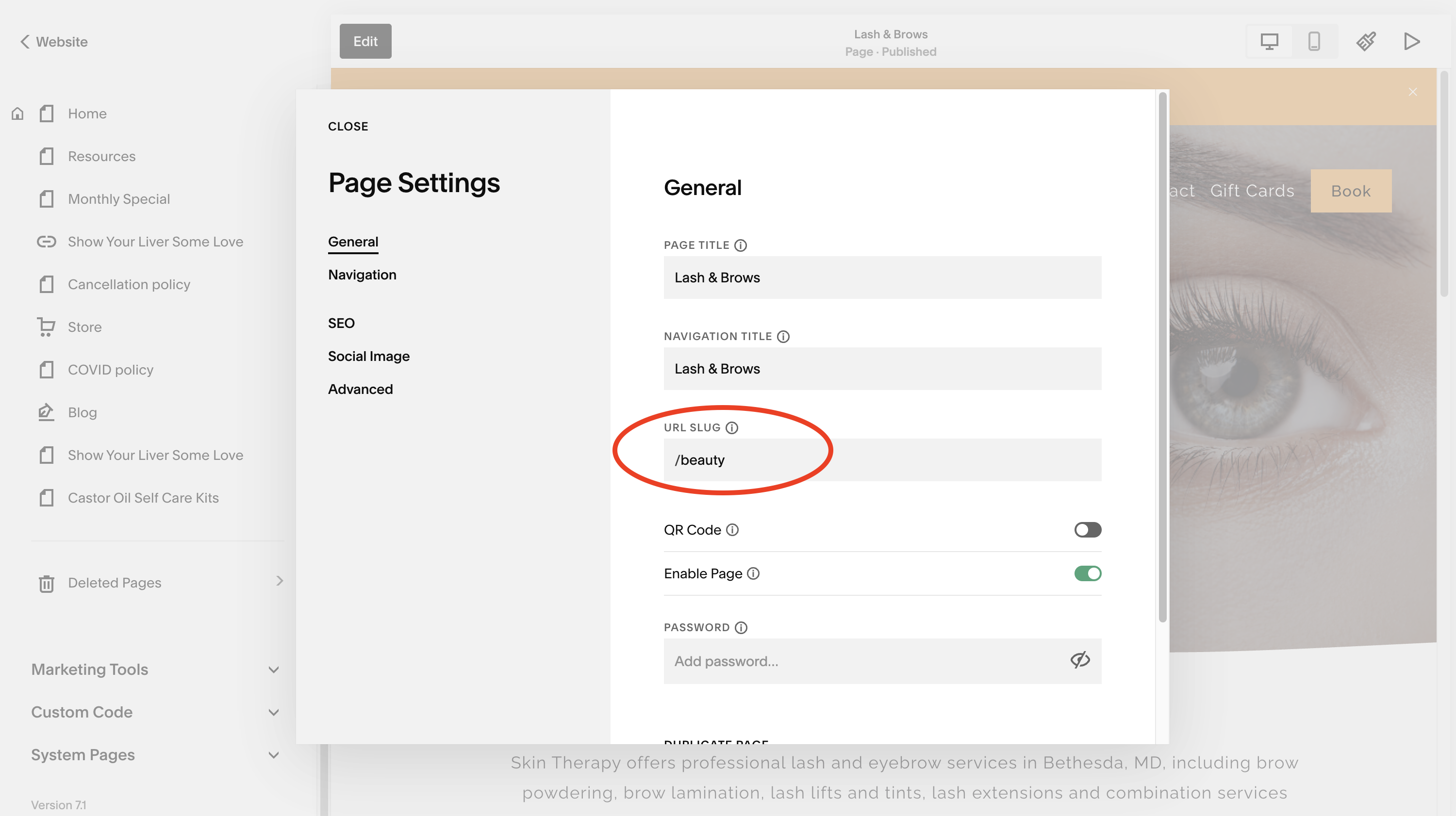
Caption: The original URL slug was /beauty, even though the page featured lash and eyebrow services.
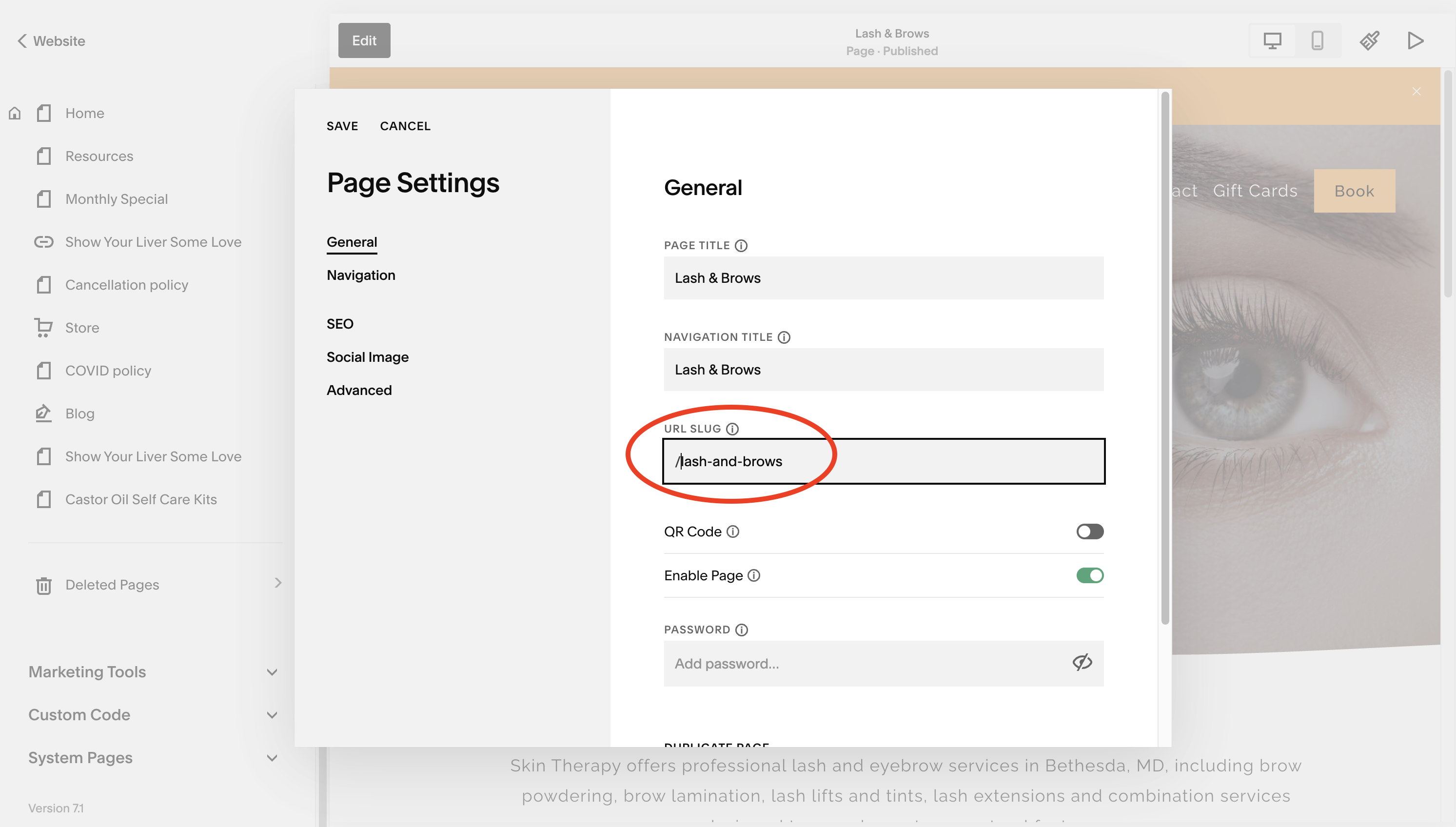
Caption: We changed the slug to /lash-and-brows to better reflect the page's services.
Next, We Set Up the 301 Redirect
Changing the slug alone doesn't mean every old link will automatically lead to the new page.
In Squarespace, we went to: Settings > Developer Tools > URL Mappings
This is where Squarespace allows website owners to create redirect rules.
We entered: /beauty -> /lash-and-brows 301
The 301 at the end tells browsers and search engines that the move is permanent.
After saving the mapping, the next step is to test the old URL and confirm that it sends visitors to the correct destination.
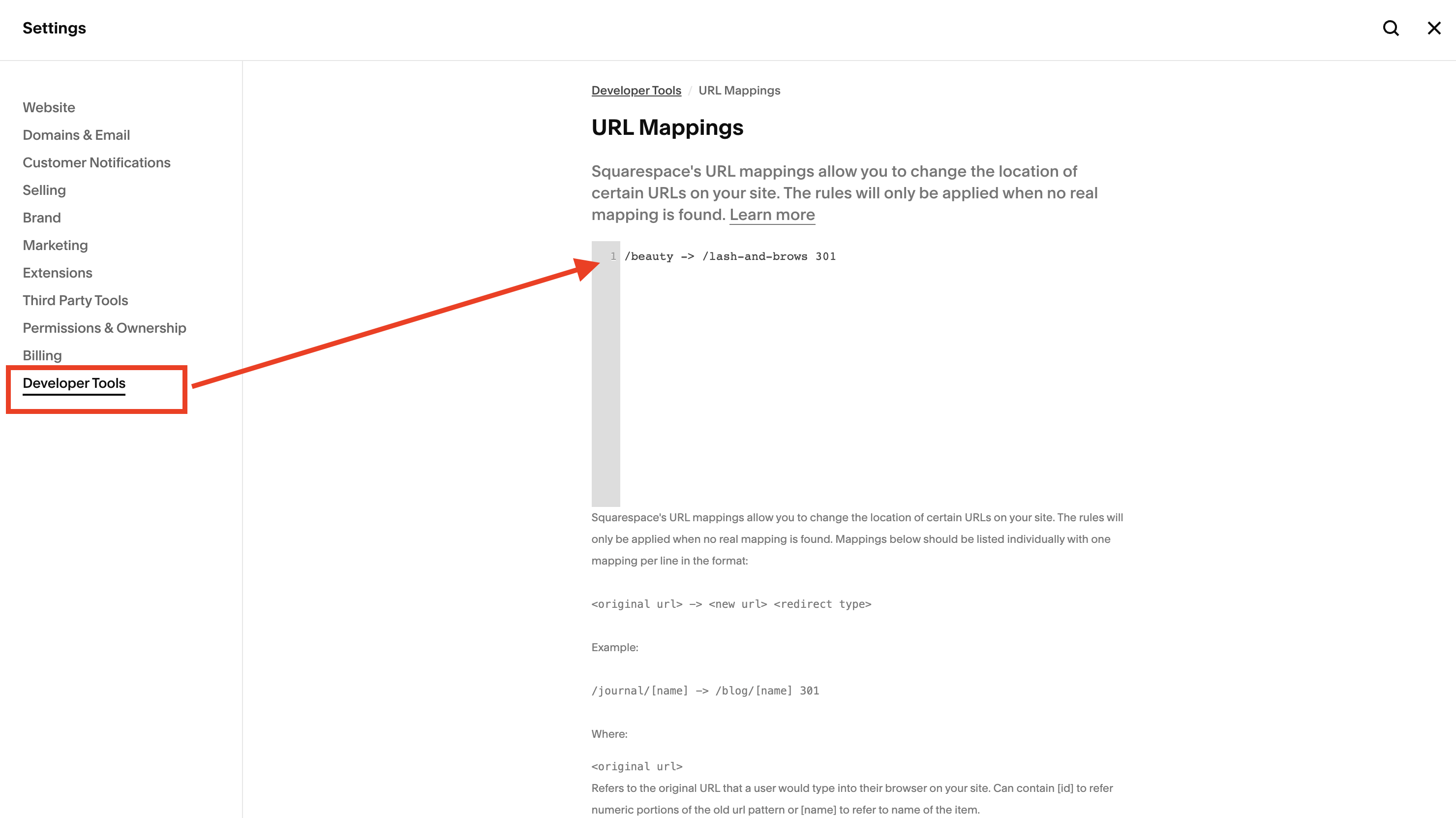
Caption: Squarespace's URL Mappings feature allows website owners to redirect old page addresses to new ones.
Don't Forget Your Page Titles, Navigation, and SEO Descriptions
We didn't stop at changing the URL, because the page specifically promoted lash and eyebrow treatments, we also reviewed the other elements that help visitors and search engines understand the content.
These included the page title, navigation title, SEO title tag, meta description, and the actual content on the page.
For example, a page about lash lifts, brow lamination, and eyebrow treatments shouldn't rely on a generic title such as "Beauty. It should clearly communicate the services available.
This helps customers understand what they'll find before clicking and gives Google more relevant information about the page.
Changing the URL without reviewing the rest of the page can leave you with inconsistent messaging.
What Is Google Search Console, and Why Should You Use It?
Once we updated the page, we moved over to Google Search Console.
If you're a business owner and you're not using Google Search Console, you're missing access to valuable information about how your website performs in Google's organic search results.
Google Search Console is a free tool from Google that helps website owners understand how Google discovers, crawls, and indexes their pages.
You can use it to see which searches bring people to your website, which pages receive clicks, how often your website appears in search results, and if Google is having trouble accessing certain pages.
You can also inspect individual URLs to see if Google has indexed them.
What Does It Mean When a Page Is Indexed?
When Google indexes a page, it stores information about that page in its search index so the page can potentially appear in search results.
Being indexed doesn't guarantee a top ranking, or even that the page will appear for every relevant search. But if Google hasn't indexed your page, that page generally cannot appear in Google's regular organic search results.
What Happened When We Checked Our New URL?
After changing the wellness spa's page URL, we entered the new address into Google Search Console's URL Inspection tool:
https://www.myskintherapy.net/lash-and-brows
Google returned this message: "URL is not on Google."
It also indicated that the URL was unknown to Google.
This wasn't surprising. We had just changed the page address. Google hadn't yet processed the new URL in its index.
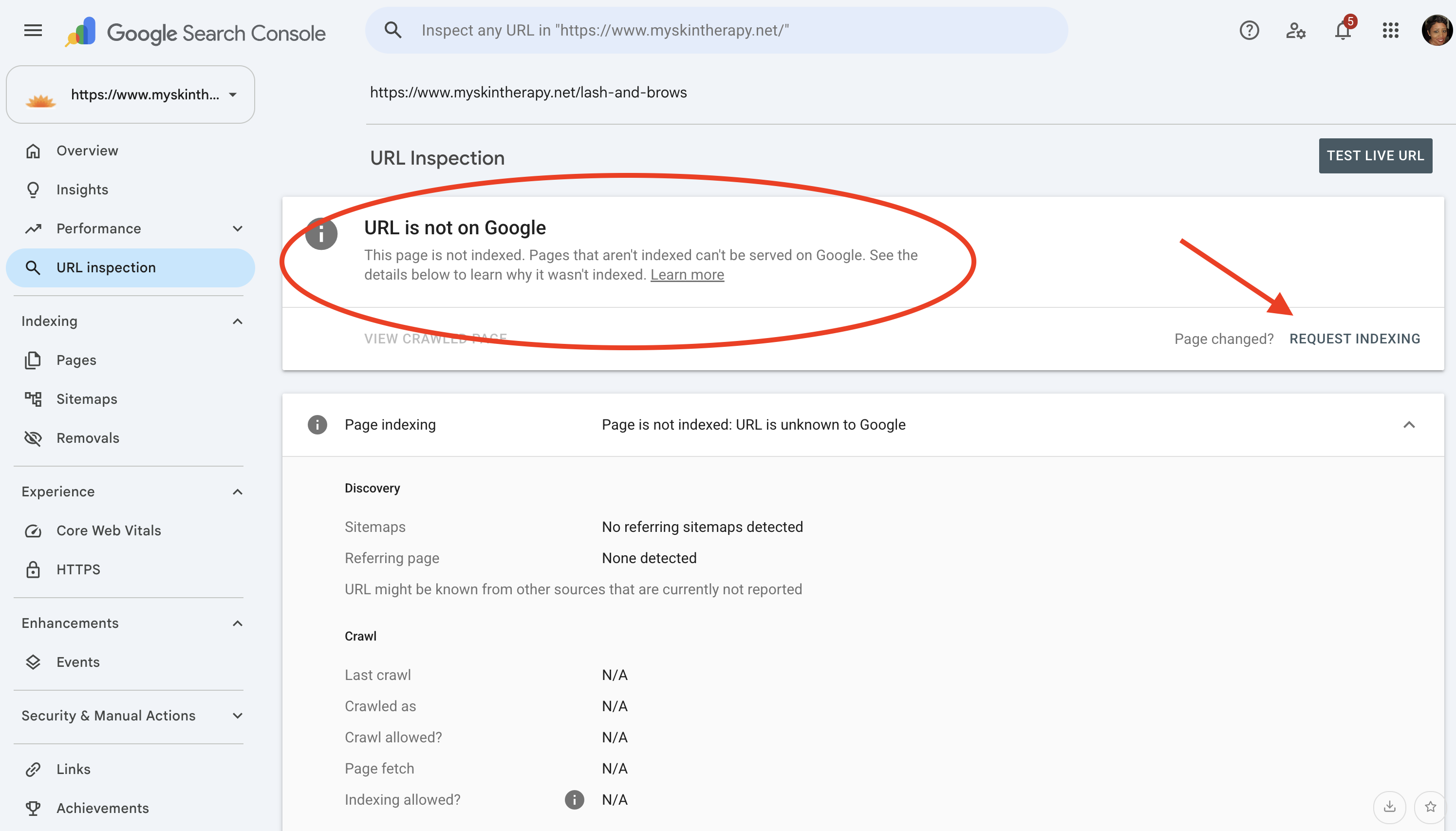
Caption: Google Search Console showed that the newly created page URL had not yet been indexed.
How Do You Tell Google That Your Page URL Has Changed?
Google can find new URLs through internal links, sitemaps, redirects, and other links across the web.
However, you can also use Google Search Console to request that Google crawl a specific URL.
Here's what we did:
-
Opened Google Search Console.
-
Selected the wellness spa's website property.
-
Entered the new page URL into the URL Inspection tool.
-
Ran a live URL test.
-
Clicked "Request Indexing."
Google tested the URL and accepted our indexing request.
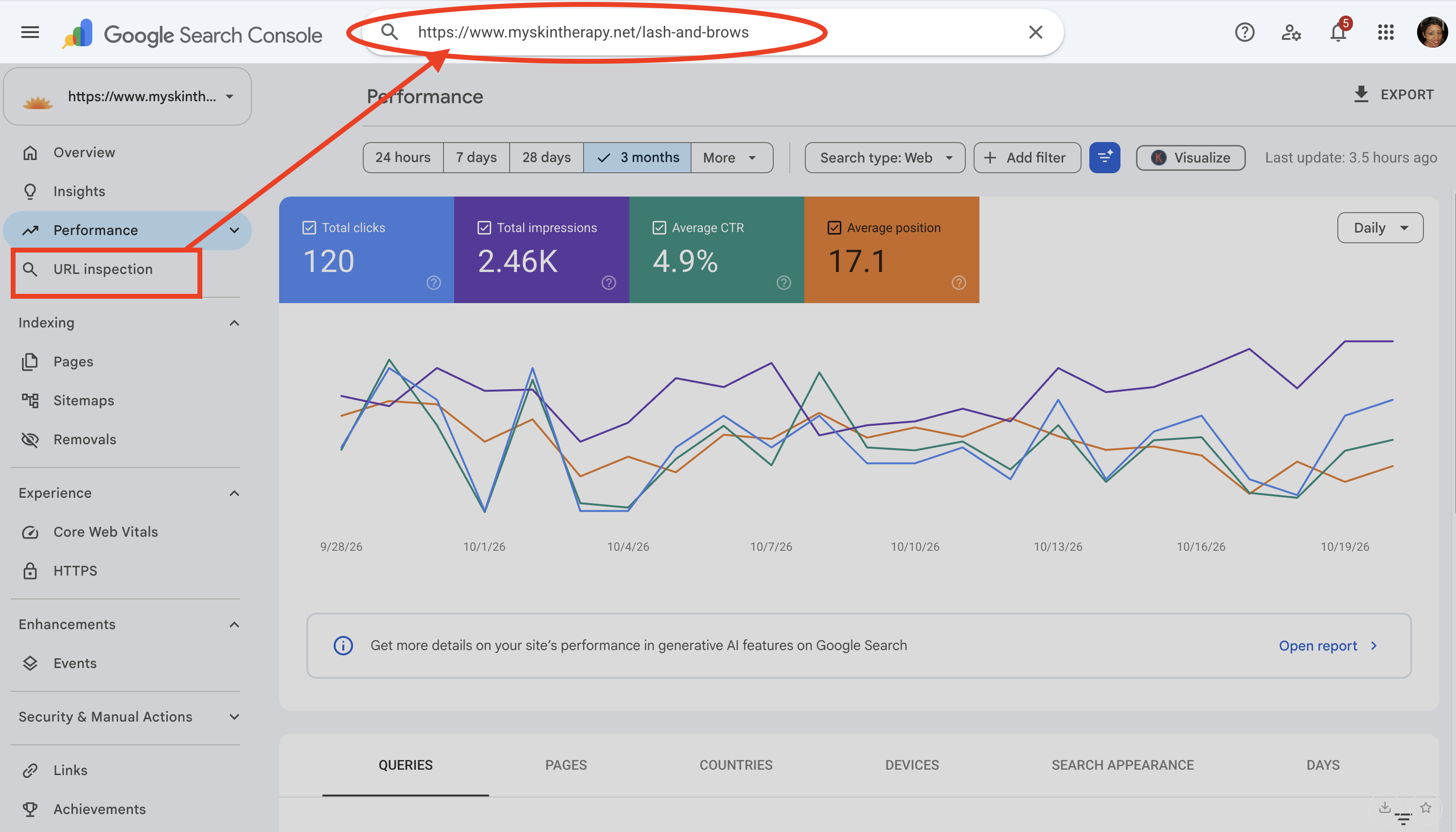
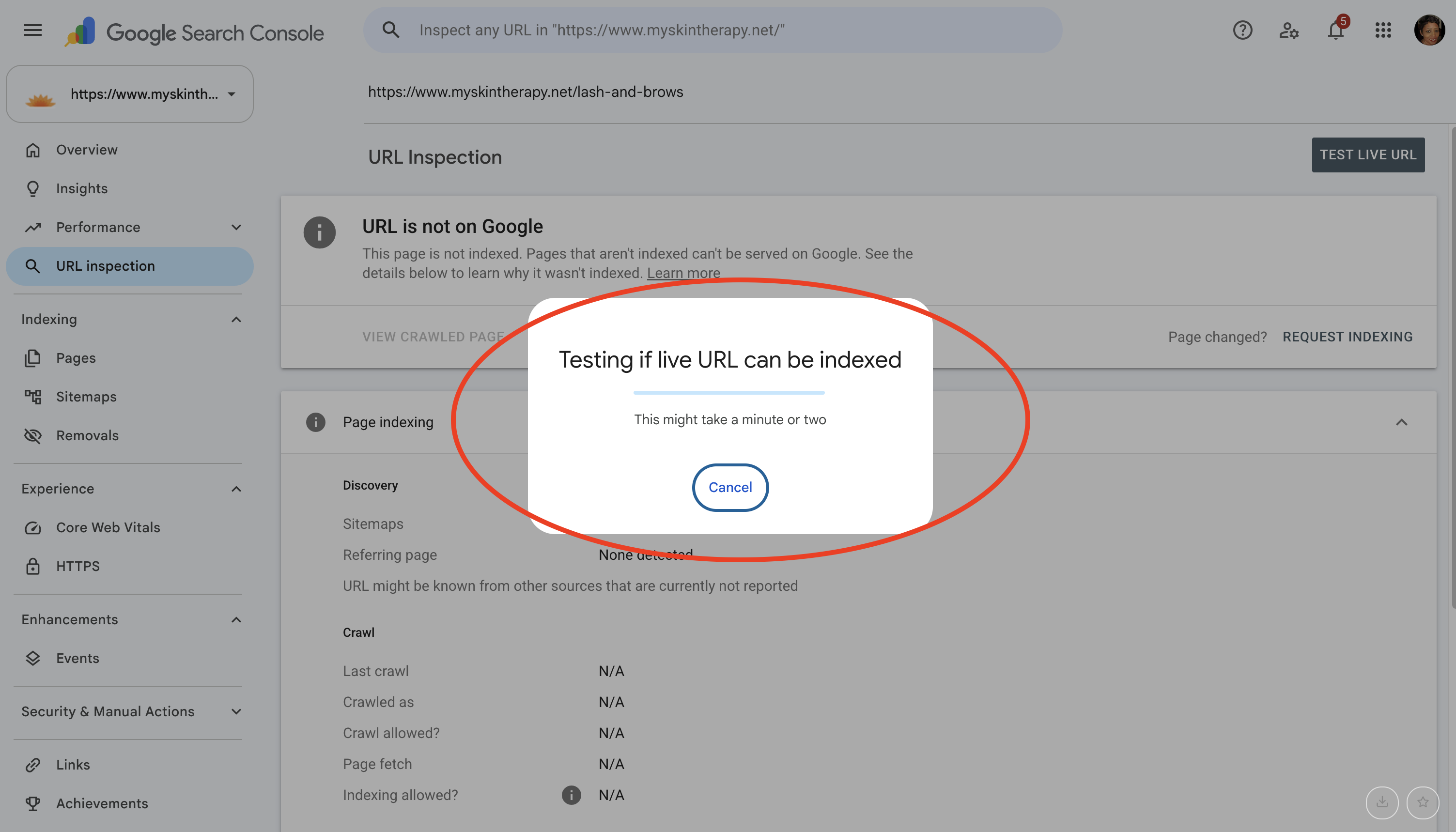
Caption: Google Search Console tested the updated Lash & Brows URL before processing our indexing request.
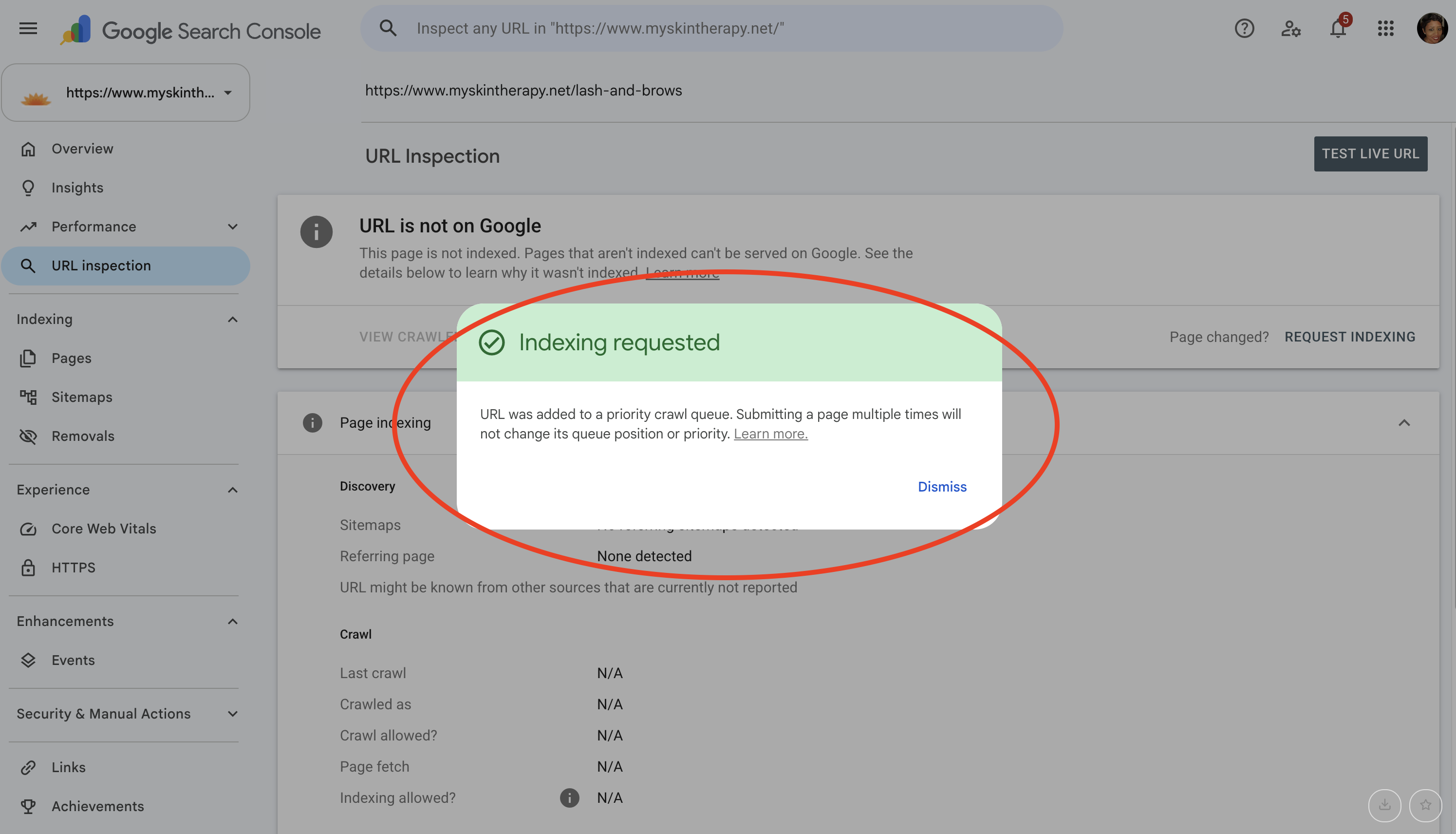
Caption: Google confirmed that the new URL was added to its priority crawl queue.
Does that mean Google indexed the page immediately? No. It means Google accepted the request and added the URL to a crawl queue. Google still determines when to crawl the page and if it should be indexed. Requesting indexing multiple times doesn't make the process faster.
We can return to Search Console later to check the page's indexing status.
One more thing: Requesting indexing does not replace a 301 redirect. The redirect helps Google and visitors reach the new URL from the old one. The indexing request asks Google to revisit the new address. Both serve different purposes.
What Is Bounce Rate, and How Do Broken Pages Affect Your Visitors?
Let's talk about something business owners often overlook. What happens when someone visits your website and immediately leaves?
In Google Analytics 4, bounce rate is the percentage of sessions that weren't considered engaged.
An engaged session is one that lasts longer than 10 seconds, includes a key event, or has at least two page or screen views.
For example, if someone visits your website, spends only a few seconds on a broken page, and leaves without doing anything else, that session may count as a bounce. But here's an important distinction.
Google does not use your Google Analytics bounce rate as a direct ranking factor.
A high bounce rate doesn't automatically mean Google will move your website down in search results. However, broken pages can still damage your business.
If visitors repeatedly encounter missing pages, you could lose appointment bookings, sales, email subscribers, and inquiries.
And if a previously indexed page disappears without a proper redirect, that old URL can lose its ability to appear in Google's search results.
So while bounce rate itself isn't the reason to create redirects, protecting the customer experience and preserving search visibility certainly are.
This Applies to Shopify, Wix, WordPress, and Other Website Platforms Too
Although our example involved Squarespace, the same principle applies to other website platforms.
If you change a URL on Shopify, Wix, WordPress, or another website platform, you should check that the old URL properly redirects to the new one.
Most major platforms provide redirect features, although the settings and steps vary.
This applies when you rename a service page, change a product URL, reorganize website categories, update blog post addresses, or migrate to another website platform.
And here's something else to remember.
You should redirect an old URL to the most relevant replacement page, not automatically send everything to your homepage.
If someone was looking for lash extensions, they should land on the lash services page, not a generic homepage where they have to start searching again.
Changing Your Website URLs? Here's What to Check
Before considering the job complete, review the following:
-
Is the new URL published and working?
-
Does the old URL redirect to the correct new page?
-
Is the redirect permanent (301)?
-
Have you updated the page title, navigation, SEO title, and meta description where needed?
-
Do your internal website links point directly to the new URL?
-
Have you checked the new URL in Google Search Console?
-
Have you requested indexing if appropriate?
-
Have you checked that your website's sitemap includes the updated URL?
You don't need to be an SEO expert to understand why these steps are important. But skipping them can create unnecessary problems for your website and your customers.
This Is the Kind of Work We Handle for Our Mastering P.o.P. Members
The wellness spa featured in this article is a Mastering P.o.P. member who also pays for our Done For You Digital Marketing Services.
That means the business owner doesn't have to spend time figuring out how to change URLs, set up redirects, optimize pages, or submit updates to Google.
We handle the work for them.
Our Done For You services include website updates and SEO, blog writing, email marketing, Google Business Profile maintenance, search visibility monitoring, and other ongoing marketing activities.
We also provide ongoing digital marketing coaching for business owners who prefer to learn how to manage and improve their own marketing. The difference is simple.
Some business owners want to learn how to do the work themselves. Others would rather have someone take care of it so they can focus on running their business. We offer both.
Have You Changed Pages on Your Website Without Setting Up Redirects?
If you've renamed services, changed product URLs, deleted pages, or redesigned your website, it's worth checking that your old URLs still send visitors to the right places.
You may have broken links you don't even know about.
GOT QUESTIONS? 20+ YEARS OF ANSWERS.
Want more website traffic, better Google visibility, and more opportunities to turn visitors into customers?
Learn more about Mastering P.o.P.'s digital marketing services